

Readers like you help support this site. When you make a purchase using links on our site, we may earn an affiliate commission. All opinions remain our own.


Whether you’re posting opinions or following breaking news, Truth Social brings over 1 million users of open dialogue to ChromeOS via its Android app or web version.
It’s free and built for those who value unfiltered voices.
We’ll show you how to set up Truth Social, highlight its best features, and explore why it’s worth a try.
Ready to speak out? Share your thoughts or contact us below.
How to Set Up Truth Social on Chromebook
Truth Social runs on Chromebook through its Android app or web version. Pick your way to join the conversation.
Method 1: Install Truth Social Android App
- Open the Google Play Store on your Chromebook.
- Search for “Truth Social.”
- Click “Install” to download.
- Launch the app from your drawer.
- Sign in or create an account.
Quick Tip: 💡 Enable notifications to catch live updates.
Method 2: Use Truth Social Web Version
- Open Chrome on your Chromebook.
- Visit truthsocial.com.
- Sign in or sign up with your email.
- Start posting from your browser.
Quick Tip: 💡 Add it to your shelf for one-click access.
App vs. Web: What’s the Difference?
- Android App: Full features, mobile-friendly, great for regulars.
- Web Version: No install, instant use, perfect for quick posts.
- Which to Choose? App for deep engagement; web for fast checks.
What is Truth Social About?
Truth Social, launched in 2022 by Trump Media & Technology Group, is a social platform available on Chromebook via Android or web, with a 3.5-star Android rating.
It stands out with uncensored posts and live streams, offering more freedom than mainstream apps like Twitter, ideal for open debate.
Key Features:
- Truths and Re-Truths (posts and shares)
- Direct messaging up to 1000 characters
- Live streaming (Truth+)
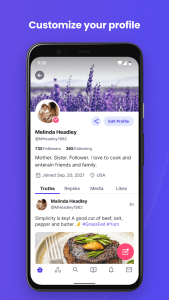
- Custom profiles and feeds
Why You Might Like Truth Social:
It’s great for sharing unfiltered takes on news or streaming live events, with a Chromebook setup that’s simple and direct.
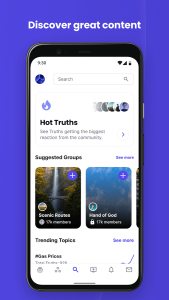
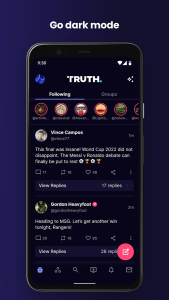
Truth Social Screenshots


Truth Social on Chromebook FAQ:
- Is it free? Yes, core features are free; streaming may cost.
- Does it work offline? No, internet is needed.
- Can I post freely? Yes, within legal limits.
Truth Social Chromebook Requirements:
- OS Version: ChromeOS with Android 9.0+ or Chrome 90+.
- Device Specs: 4GB+ RAM recommended.
- Storage Space: 1GB+ for app, minimal for web.
- Internet: Required for use.
For more help: