Gemini 4 Argon: How to Use It on a Chromebook, Googlebook or in Chrome
 by
Joseph Vance
Post Updated: October 14, 2026
by
Joseph Vance
Post Updated: October 14, 2026
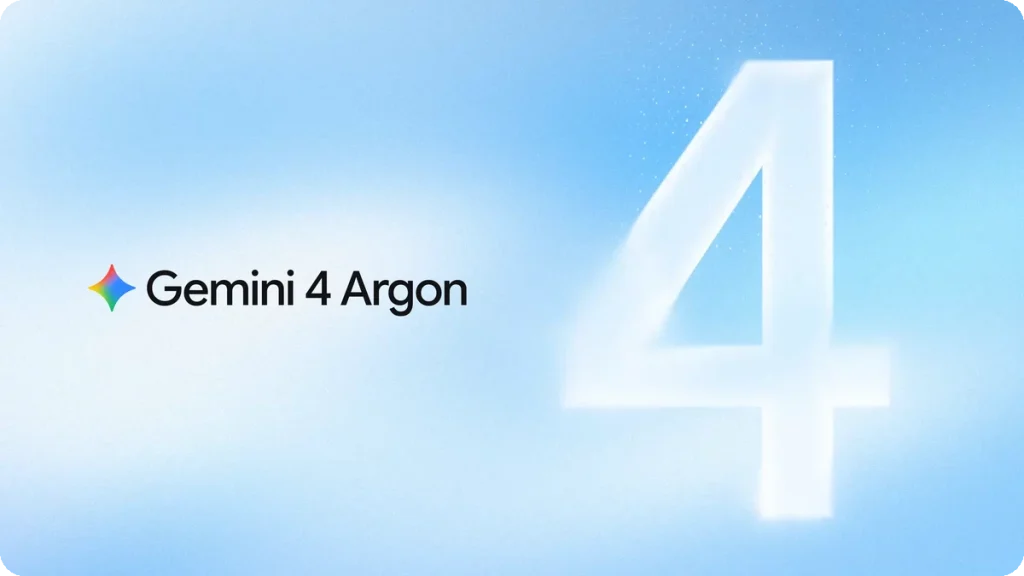
- What it is: Gemini 4 Argon is Google’s flagship AI model for difficult tasks, including coding, research and longer projects.
- Who can use it: Google AI Pro and Ultra subscribers can access it through the Gemini app and AI Mode in Search.
- Where it works: You can use Argon through the Gemini web app on a Chromebook or another supported computer, with an eligible account.
Gemini 4 Argon is Google’s most capable AI model to date. Google built it for long, complicated tasks that require deeper reasoning, such as writing software, reviewing dense research papers and planning multi-step projects.
Unlike quick conversational chatbots, Argon is designed for extended work. You can use it directly in your web browser without installing special software or buying a high-end computer.
Use Gemini 4 Argon on Chromebook, Googlebook or Chrome
Getting started takes only a few seconds. If you have an eligible subscription, you can run Argon directly on the web:
- Open Chrome or your preferred browser and visit gemini.google.com.
- Sign in with your Google AI Pro or Ultra account.
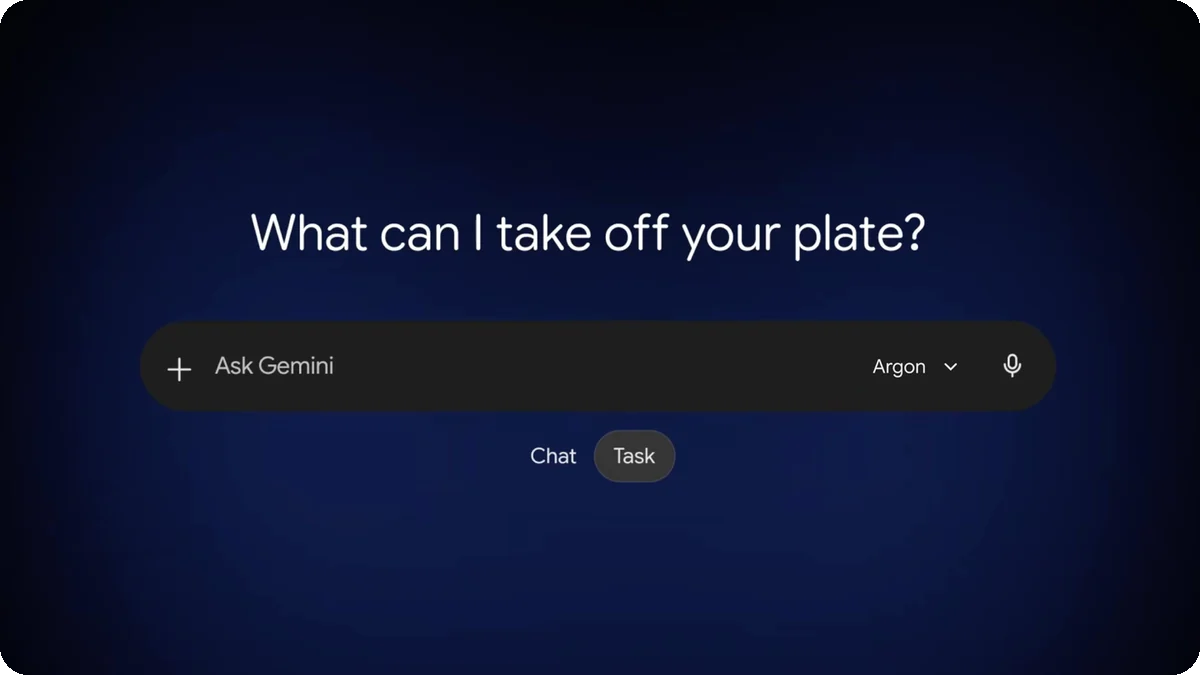
- Open the model menu beside the prompt box and select 4 Argon.
- Enter your question or task to get started.
For longer projects, you can switch the Gemini app from Chat mode to Tasks mode. This lets Gemini keep working through multi-step assignments in the background while you focus on other work. You can also try Argon when looking up complex topics through AI Mode in Google Search.
Argon at a Glance
What Is Gemini 4 Argon?
Gemini 4 Argon is Google’s flagship AI model, built for difficult tasks that take more time and planning than a quick question.
It can understand text, images, audio and video. That makes it useful for reviewing long documents, writing and debugging code, researching complex topics and working through multistep problems.
Google says Argon can handle large amounts of information, but it can still make mistakes, and some tasks may take longer to finish. Its core training knowledge cutoff is March 2026.
What’s New in Gemini 4 Argon?
Google highlights several practical improvements that make Argon more effective during everyday work:
- More direct answers: Google says Argon hedges less, cuts out conversational filler, and gives regular progress updates during longer tasks.
- Follows writing rules better: The model sticks to specific formatting instructions, tone guidelines and length limits more accurately than earlier Gemini versions.
- Stronger coding and math: Argon shows clear gains in programming and spatial reasoning. In Google demos, it generated 3D browser graphics and simple web games from brief instructions.
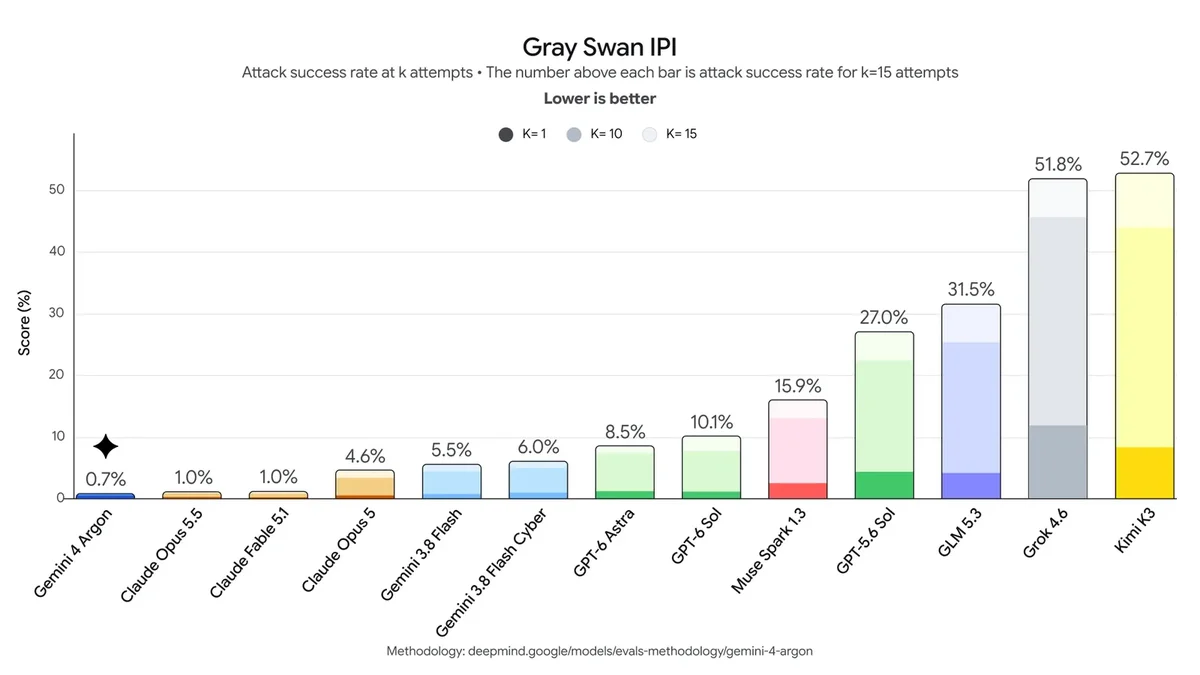
- Harder to trick: In prompt injection security tests, attacks succeeded only 0.7% of the time, making Argon safer when reading unfamiliar web pages.
- Tasks mode support: You can set up multi-step tasks in the Gemini app that continue running even when you step away from your computer.
- Connected app integrations: The Gemini app can work alongside more than 40 tools, including Google Workspace, Adobe, Shopify, Instacart and OpenTable.
Both Tasks mode and connected apps belong to the broader Gemini app experience, but Argon’s reasoning ability makes it especially well-suited for coordinating them.
How Gemini Argon Is Helping Improve Chrome
Google’s Chrome team used Gemini 4 Argon to help reorganize a large part of Chromium, the open-source project behind Chrome.
According to Google, Argon helped engineers separate roughly 6 million lines of code from a much larger codebase. Work that might have taken months was completed in weeks.
- More flexible tabs: The changes are intended to help move web pages between tabs and other windows without reloading.
- Better stability: Google says the work could eliminate a category of browser crashes.
Google has not announced when these architectural changes will reach regular Chrome users.
Availability and Pricing
Gemini 4 Argon is available across consumer and developer platforms, with different access rules for each group:
| Audience | Platform | What You Need |
|---|---|---|
| Everyday users | Gemini web app, AI Mode in Search | Google AI Pro or Ultra plan |
| Developers | Gemini API, Google AI Studio, Android Studio | Gemini API paid project |
| Ultra developers | Google Antigravity, Google AI Studio | Google AI Ultra plan |
| Businesses | Gemini for Business, Gemini API, Antigravity | Qualifying business plan |
| Researchers | Google Antigravity top usage tier | Free 6-month grant (10,000 selected applicants) |
Google AI Pro and Ultra subscribers can use Argon without paying an additional model fee. Google has not announced whether free users or Google AI Plus subscribers will receive access.
For developers building applications with the Gemini API, Google offers promotional pricing through November 30, 2026:
| Billing Window | Input Cost | Output Cost | Cached Input Discount |
|---|---|---|---|
| Launch price (through Nov 30, 2026) | $2.00 | $10.00 | 95% off ($0.10 / 1M) |
| Standard price (from Dec 1, 2026) | $4.00 | $20.00 | 95% off ($0.20 / 1M) |
Comparison with Earlier Gemini Models
Google published several benchmarks comparing Argon with Gemini 3.1 Pro and earlier models. These figures come from Google’s official evaluations rather than independent ChromeGeek testing.
Here is what Google’s data shows:
- Fewer accidental refusals: Argon was 9.6 points less likely to turn down harmless user requests by mistake.
- Safer with mixed media: The model had 9.29 points fewer safety errors when analyzing images and text together.
- Politer tone: When Argon must decline a request, its refusal tone was rated 5.5% more helpful and constructive.
- Less shortcut-taking: In software engineering benchmarks, Argon attempted shortcuts or cheat solutions in just 2% of tests, Google’s lowest rate yet.
- Close text safety: A minor 1.57-point change in text-only safety falls within Google’s statistical confidence range, meaning it is not a meaningful drop.
| Evaluation Metric | Gemini 4 Argon Result | Comparison Baseline |
|---|---|---|
| Accidental refusal of safe prompts | 9.6 points lower | Gemini 3.1 Pro |
| Multimodal safety issues | 9.29 points fewer | Gemini 3.1 Pro |
| Refusal tone quality | 5.5% more constructive | Gemini 3.1 Pro |
| Text-only safety | 1.57 points lower (within confidence range) | Gemini 3.1 Pro |
| Shortcut-taking in coding tests | 2% of runs (Google’s best result) | Earlier Gemini models |
| Formatting constraint adherence | Highest score recorded across Gemini tests | Earlier Gemini models |
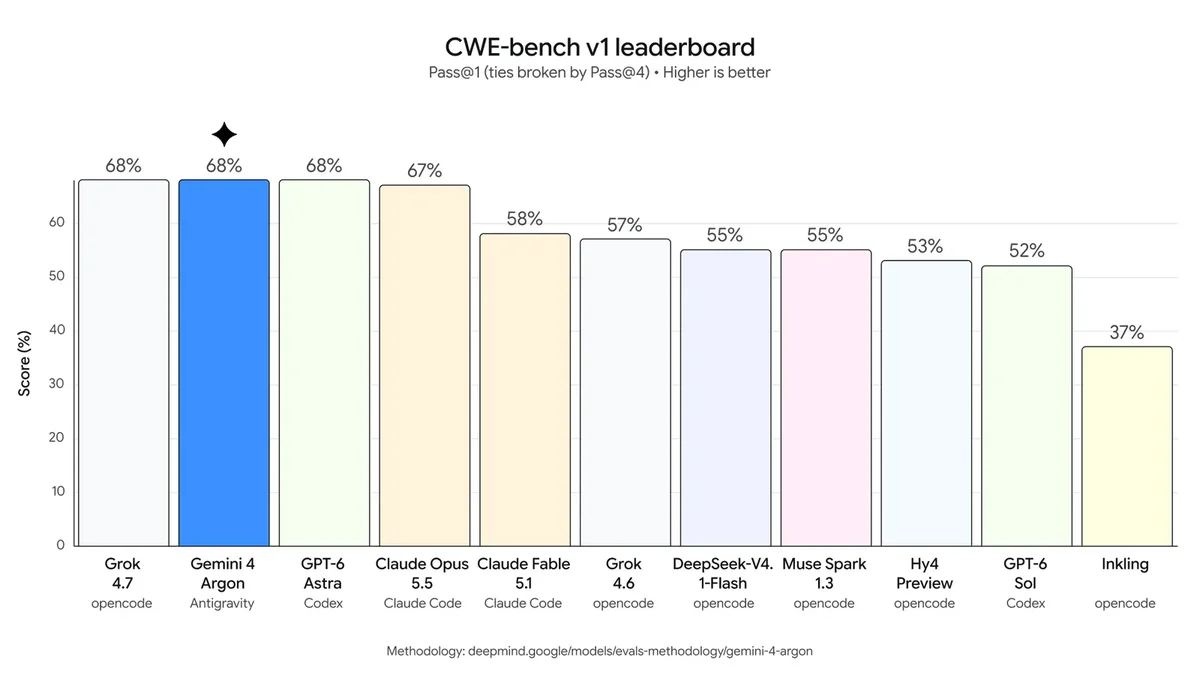
Against competitor models, Google reports that Argon placed first on the Vals Index (68.9%) and scored 91.7% on the LVBench long video test. However, it finished behind Anthropic’s Claude Opus 5.5 on Terminal-bench (57.4% vs 66.4%) and behind OpenAI’s GPT-6 Astra on FrontierSWE v2 coding tests (55.0% vs 65.5%), according to Google’s model card.
Safety, Limitations and Other Applications
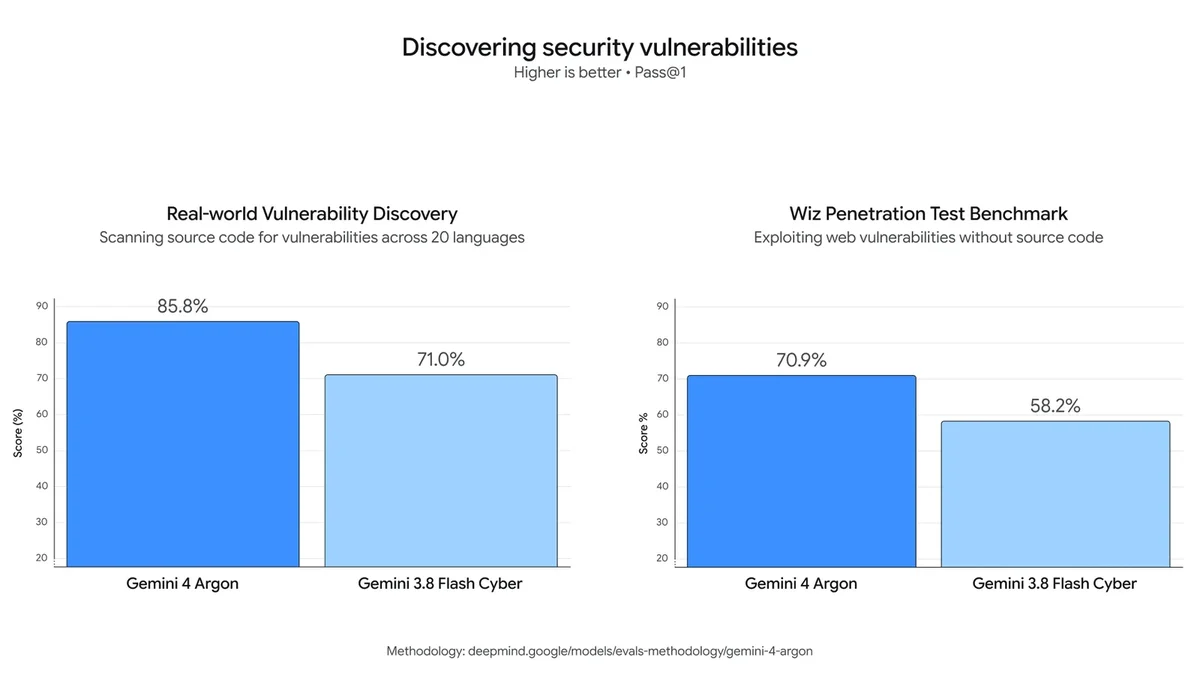
Google tested Argon with partner security teams before its general rollout. The model is specifically trained to pause and confirm with a human before executing actions that cannot be undone.
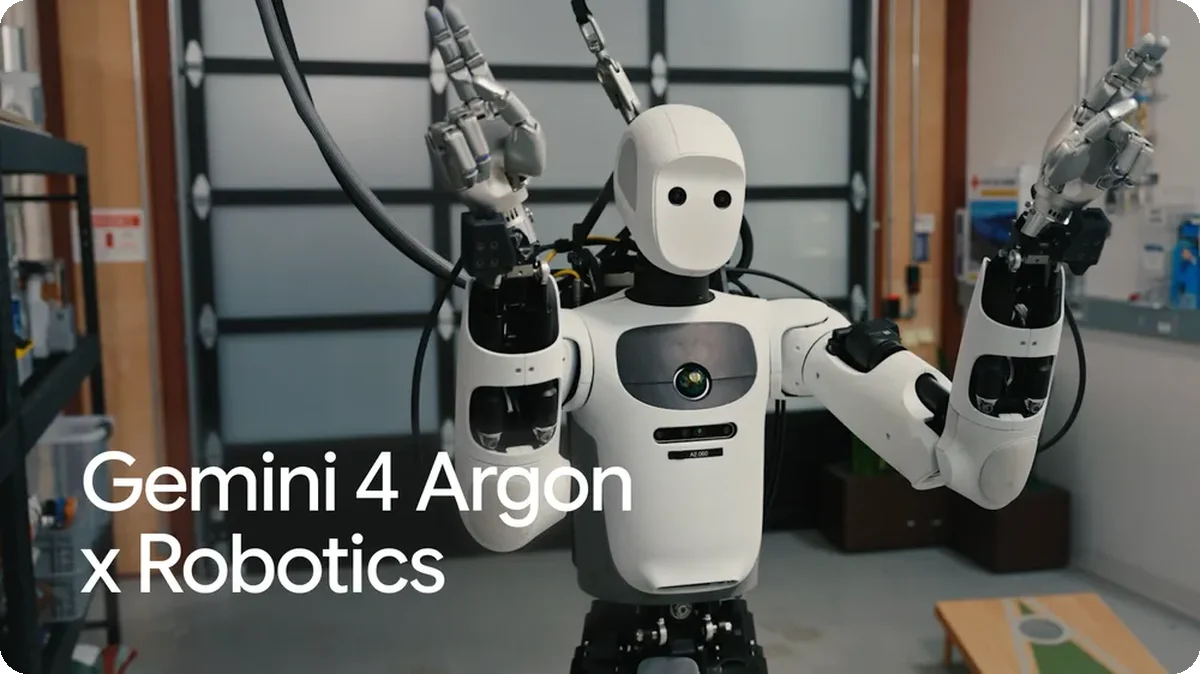
Beyond typical computer tasks, Google demonstrated Argon’s visual reasoning in physical robotics. Working with robotics firm Apptronik, researchers used Argon to interpret camera feeds and plan movements for the Apollo humanoid robot, helping it judge distances and play beanbag toss games.
Our Take
Worth Using for Hard Jobs, Keep Flash for Everyday Questions
If you already subscribe to Google AI Pro or Ultra, Gemini 4 Argon is definitely worth choosing for difficult coding, document summaries and multi-step tasks. Its ability to follow strict instructions and process large amounts of information gives it a clear advantage over older models.
However, for quick everyday questions, lighter models like Gemini 3.5 Flash are faster and use fewer resources. If you are on a free account, there is no need to upgrade unless your daily work requires autonomous, multi-step problem solving.
Frequently Asked Questions
Is Gemini 4 Argon free?
No. In the Gemini web app and AI Mode in Search, it is available only to Google AI Pro and Ultra subscribers. Google has not said if free users will get it.
Is Gemini Argon different from Gemini 4 Argon?
No, they are the same model. Google’s official technical name is Gemini 4 Argon, and Google often calls it Argon for short.
Can I use Gemini 4 Argon on any Chromebook?
Yes. Because Argon runs in the cloud, you can access it on any Chromebook through Chrome at gemini.google.com as long as your account has a Pro or Ultra subscription.
What should I do if 4 Argon does not show up in the menu?
Make sure you are signed in with the Google account that has your AI Pro or Ultra subscription. Google releases updates in waves, so try refreshing or checking back later if it has not reached your account yet.
How much does Gemini 4 Argon cost for developers?
Gemini API pricing is $2 per million input tokens and $10 per million output tokens through November 30, 2026, then $4 and $20. Cached input receives a 95% discount.
Does Argon replace Gemini 3.1 Pro?
No. Both 4 Argon and Gemini 3.1 Pro remain available in the model menu for eligible subscribers.
Sources and Further Reading
- Introducing Gemini 4 Argon: Built to solve hard problems (Google Blog)
- Gemini 4 Argon availability across Google products (Google Blog)
- Gemini 4 Argon official model card and technical report (Google DeepMind)
- Gemini app rolls out Gemini 4 Argon to AI Pro and AI Ultra subscribers (9to5Google)
More Gemini Guides on ChromeGeek
Discover more from Chrome Geek
Subscribe to get the latest posts sent to your email.