Google Research Open-Sources Harness2 for Self-Improving AI Agents
 by
Sophie Sullivan
Post Updated: October 19, 2026
by
Sophie Sullivan
Post Updated: October 19, 2026
Google Research has released Harness2 (written Harness² by its authors), an open-source framework that lets AI agents get better at tasks without retraining the AI model underneath. The code, released under the Apache 2.0 license, is available on GitHub, and it comes with a demo you can run on your own computer.
What is a harness?
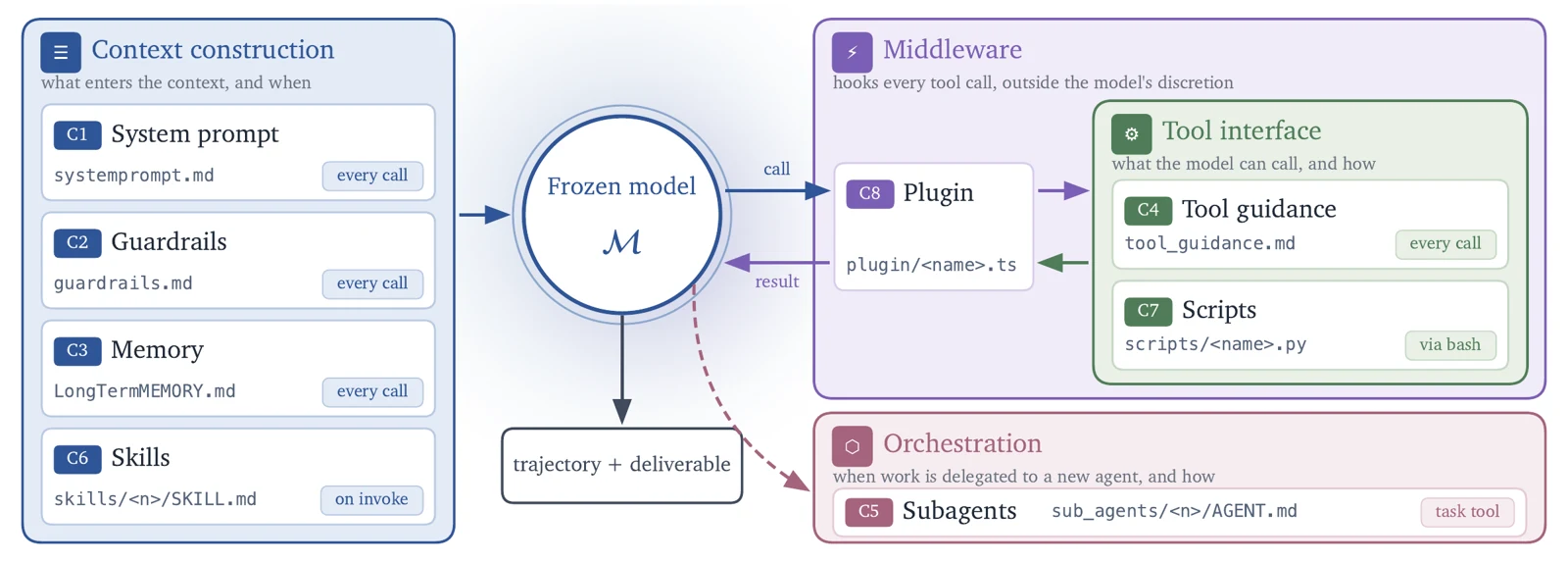
A simple way to think about it: an AI model is like an engine. The harness is everything built around it so it can actually do a job: the instructions it gets (prompts), the tools it can use, its memory, its skills and the rules for how it works step by step.
Why it matters: the same model can do much better or much worse depending on its harness. Today, people usually tune these harnesses by hand. Harness2 tries to let the agent do that tuning itself.
How Harness2 works
Eight editable parts: Harness2 can change the system prompt, guardrails, memory, tool guidance, subagents, skills, scripts and plugins. The model’s weights are never changed.
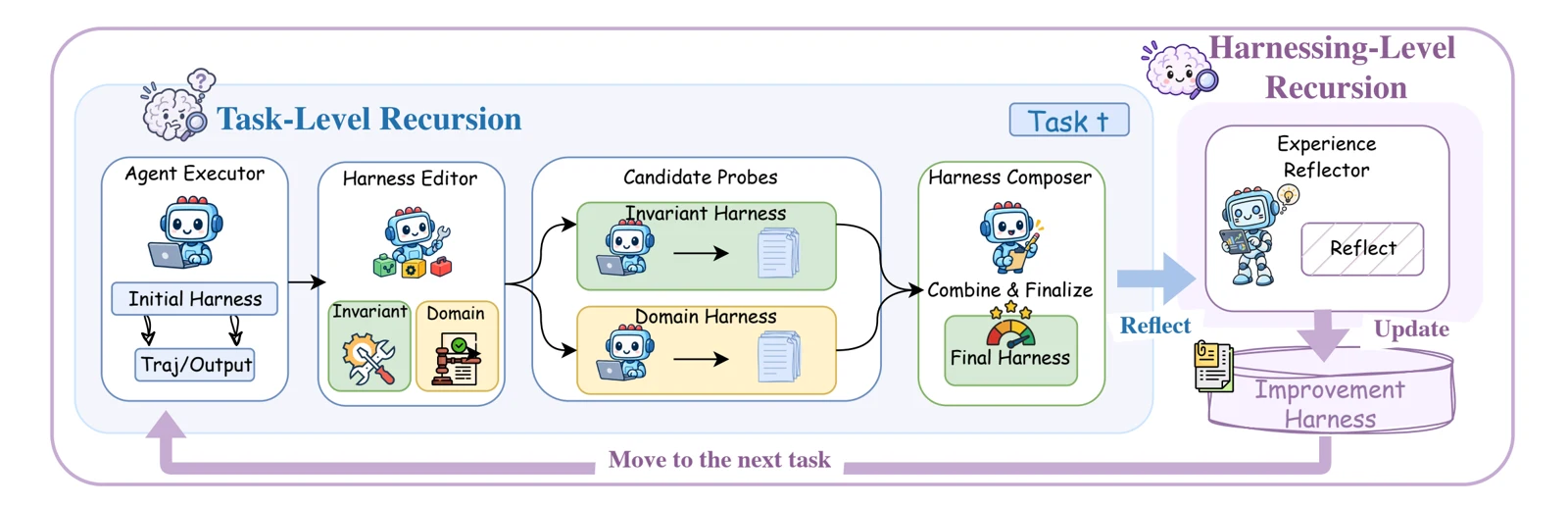
Improving one task: for each task, the agent proposes changes to its harness, tests them on that same task, then combines the changes that worked into a better harness. The team calls this Propose, Probe, Compose. It does not need an answer key to know which changes helped.
Learning for next time: after each task, it saves the harnesses that worked and short lessons, so later tasks start from a better place.
Does it actually help?
Test results: in the research paper, one round of Harness2 improved two models, GLM-5 and Gemini 3.5 Flash, on three work benchmarks. Gains reached up to 11.5 points on WorkBuddy-Bench, 4.5 points on JobBench and 11.8 percentage points on LAB, a legal work benchmark.
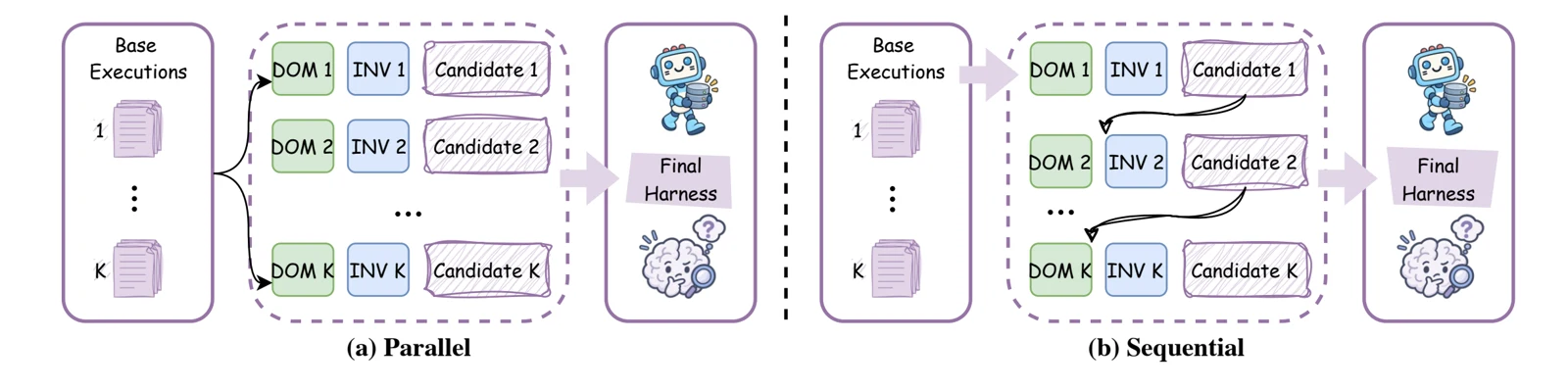
More rounds, more gains: the researchers say results kept improving when Harness2 was given more rounds per task. It can explore several options side by side (parallel) or refine one step after another (sequential).
What it means for you
Not an app: Harness2 is a tool for developers and researchers. It does not change Gemini, Chrome or your Chromebook today, and the repo says it is not an officially supported Google product.
Why it is still worth watching: the idea that an AI helper can tune its own instructions and tools, without a bigger model, could make future assistants cheaper and better at specific jobs.
Try the demo on a Chromebook? the official instructions only say to use Linux, Python 3.12 and the uv tool. They do not mention Chromebooks. Since ChromeOS can run Linux through its Linux development environment, it should be possible there, but we have not tested it on a Chromebook. We did run the demo on a regular Debian Linux PC, and it finished in under a minute. The commands from the repo are:
uv venv --python 3.12 .venv
source .venv/bin/activate
uv pip install -e '.[render]'
harness2-demo --output runs/demo --k 2
What the demo does: it shows the improvement loop with simple built-in editors and real Python runs, so no AI model is involved and nothing costs money. The full benchmarks are different: they need Google Cloud and Vertex AI access, extra tools like Node.js and Docker, and they run up real API costs.
Curious where Google’s agents are heading? Read our coverage of AI agents at Google I/O 2026.
Discover more from Chrome Geek
Subscribe to get the latest posts sent to your email.