Targeted Ads Delivered Zero-Click Candiru Spyware, Citizen Lab Finds
 by
Sophie Sullivan
Post Updated: October 19, 2026
by
Sophie Sullivan
Post Updated: October 19, 2026
Researchers at Citizen Lab have published what they call the first public technical confirmation of mercenary spyware delivered through targeted online ads. In its October 15 report, the lab says an Israeli company called Discover-Tech helped turn ordinary ad slots into a pipeline for Candiru’s spyware, which was used against devices at the news network Al Jazeera.
What Citizen Lab found
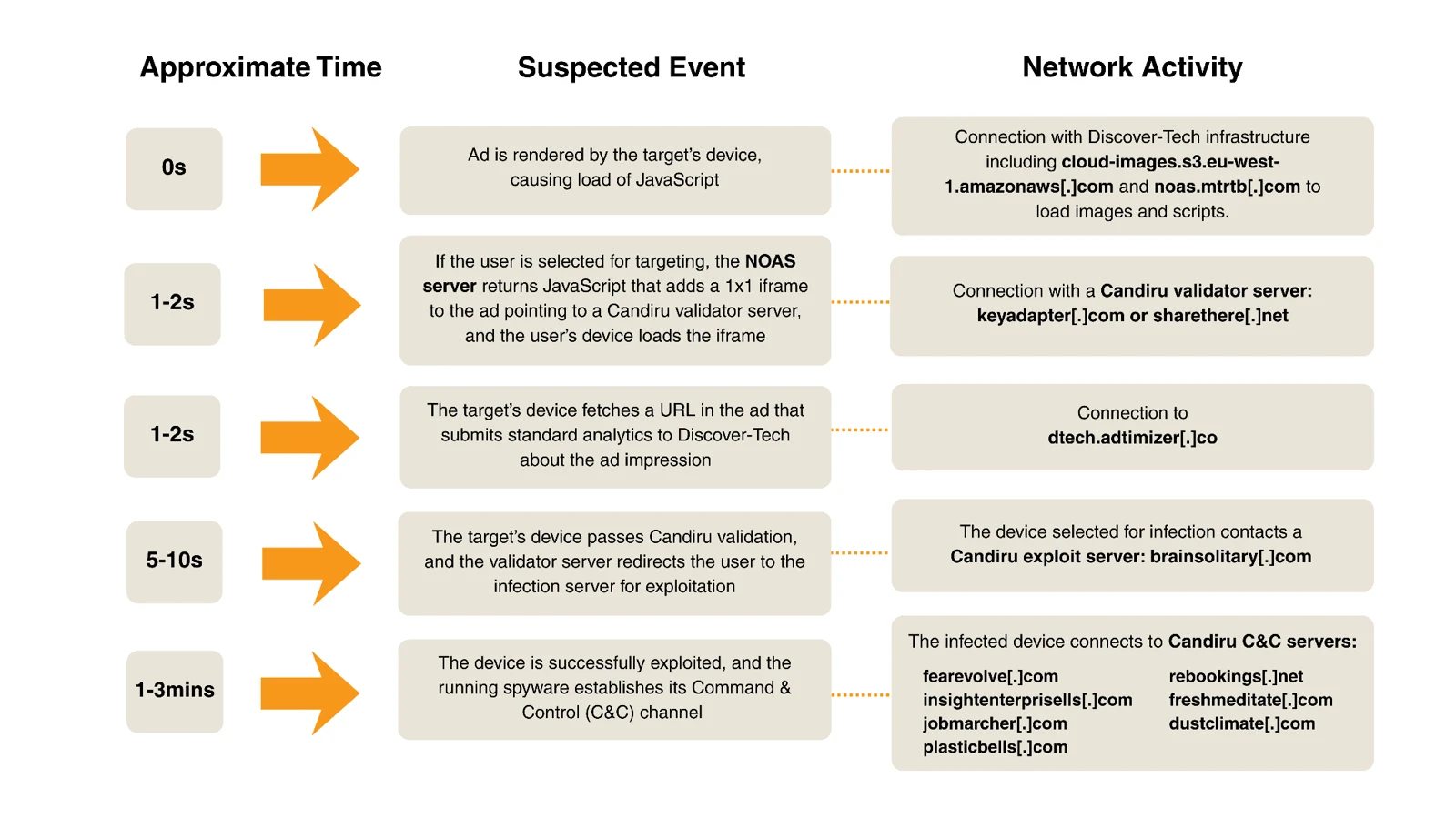
How the attack worked: Discover-Tech bought ad space through mainstream ad networks and exchanges. Its ads carried code that checked whether the device showing the ad was on a target list. Targets received more code, and everyone else got nothing, which kept the attacks quiet.
Zero-click: Citizen Lab says simply displaying the ad on a targeted device was enough to start an infection. The victim did not need to click anything.

The Al Jazeera case: in 2024 and 2025, at least 45 devices at Al Jazeera were targeted in attacks Citizen Lab links with high confidence to Candiru. Network logs showed the same pattern each time: contact with Discover-Tech’s ad servers, then a Candiru validation server, then Candiru’s command servers.
How big was the ad operation?
Billions of bids: between March and June 2026, Discover-Tech placed about 3.77 billion bids and won around 442 million ad auctions, as BleepingComputer reports.
Almost 200,000 apps and sites: ads that Citizen Lab assessed as carrying attacker code appeared in 75,373 Android and iOS apps and on 120,768 websites. These numbers show where the ads ran, not how many devices were infected.
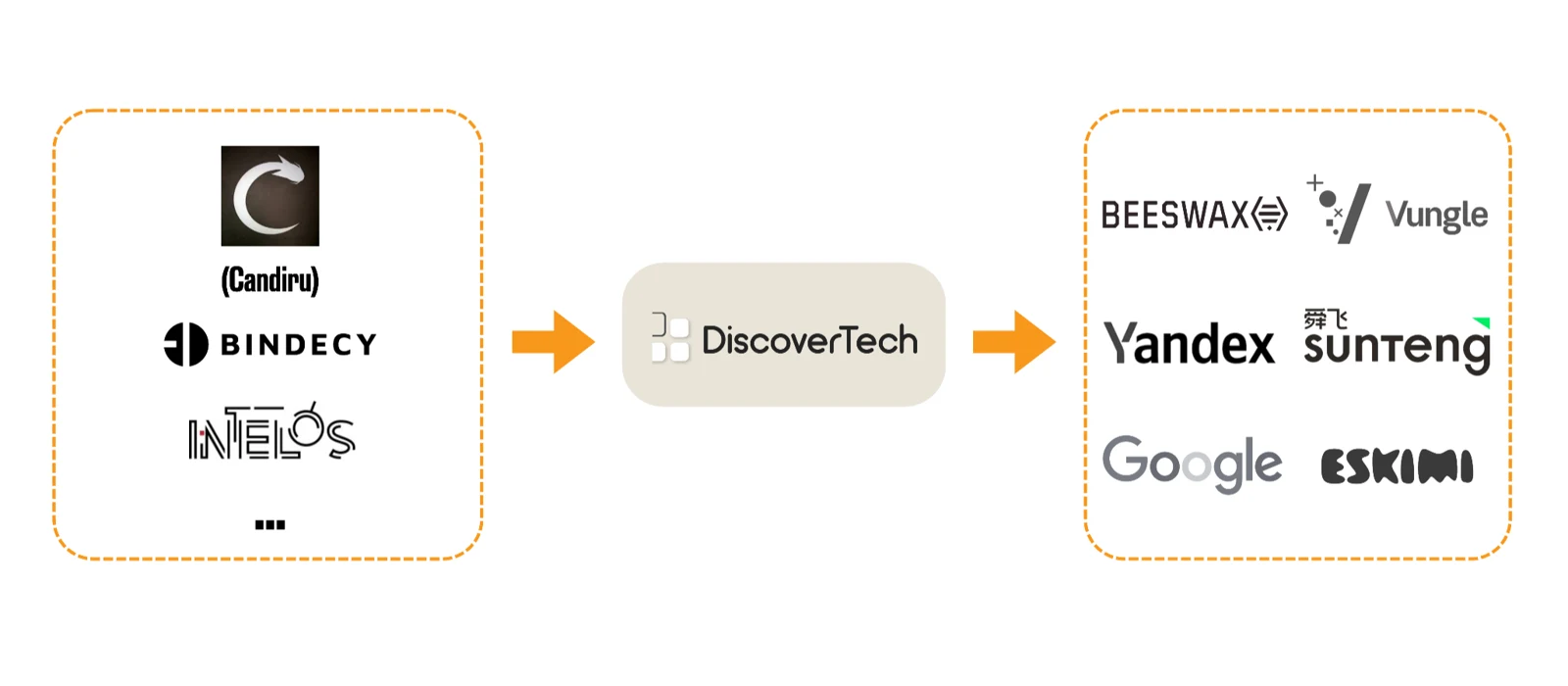
Google’s role: Citizen Lab says Discover-Tech served ads through major networks including Google, Yandex and Beeswax, and was listed as a certified or approved vendor by Google and IAB Europe from 2020 until 2026.
What Google and others did
Google’s response: according to Citizen Lab, Google collaborated in the investigation, removed Discover-Tech from its ad vendor lists in early October 2026 and cut off its access to Google’s ad exchanges. IAB Europe also removed the company, Beeswax dropped it, Eskimi blocked its accounts, and Vungle (Liftoff) paused its access during a review.
How to protect yourself in Chrome and on Chromebooks
Keep Chrome and ChromeOS updated: spyware like Candiru often relies on browser bugs. Earlier research by Google and Avast found Candiru using Chrome zero-day exploits in 2021 and 2022. Check for updates in Chrome under Settings, About Chrome, and on a Chromebook under Settings, About ChromeOS.
Use an ad blocker that works with Manifest V3: Citizen Lab calls ad blocking a cybersecurity best practice. Full uBlock Origin no longer runs in current Chrome, but uBlock Origin Lite, a separate Manifest V3 version from the same developer, is on the Chrome Web Store. See our list of the best Chrome extensions for more ideas.
Turn off personalized ads: in My Ad Center (myadcenter.google.com), set Personalized ads to Off. You will still see ads, but Google will not use your account activity to target them. Note that Chrome’s old Ad privacy page under Settings was removed in Chrome 150.
Reset your phone’s ad ID: Discover-Tech could target devices by their mobile advertising ID. Citizen Lab notes you can reset or delete this ID in your phone’s settings.
Turn on Enhanced Safe Browsing: in Chrome, go to Settings, Privacy and security, Security, and choose Enhanced protection. It warns you about dangerous sites, downloads and extensions, even ones Google did not know about before. It is a good extra layer, but it is not a guarantee against targeted spyware.
Our take: most people were never targets here, so there is no need to panic. But this report shows that ads are now a real attack route, which makes an ad blocker and quick updates worth it for everyone.
Make sure you are patched. Read about the latest Chrome 155 security update.
Discover more from Chrome Geek
Subscribe to get the latest posts sent to your email.