Chrome Adds Suspicious Site Warnings, Cloud Gemini Scam Checks and ClickFix Alerts
 by
Sophie Sullivan
October 21, 2026
by
Sophie Sullivan
October 21, 2026
Chrome is getting smarter, and more nuanced, about warning you. Google says Safe Browsing’s Enhanced Protection mode now has a new, lower-level warning for sites that just look suspicious, while the full red warning stays for sites known to be dangerous. Gemini scam detection has also moved to Google’s servers so it covers every Enhanced Protection user, and Chrome can now spot ClickFix tricks that get you to copy and run a harmful command.
1. New “suspicious site” warnings
What changed: until now, a Safe Browsing site warning was basically one thing: the big red page. In its announcement, Google says Enhanced Protection now splits site warnings into two tiers, the same idea it already uses for suspicious and dangerous downloads in Chrome.
Suspicious sites: a lower-confidence verdict with a possible risk of harm. Chrome shows this when a page uses deceptive patterns that are common on known malicious sites. Google says the warning looks different in format, icon, colour and text, so you can tell the two levels apart at a glance.
What you see: in Google’s screenshots, a red “Suspicious” shield chip appears at the left of the address bar, and a pop-up says “This site doesn’t seem right” with two buttons: “Mark as safe” and “Back to safety”. The page stays visible but dimmed behind it. On mobile, the same message slides up from the bottom of the screen.
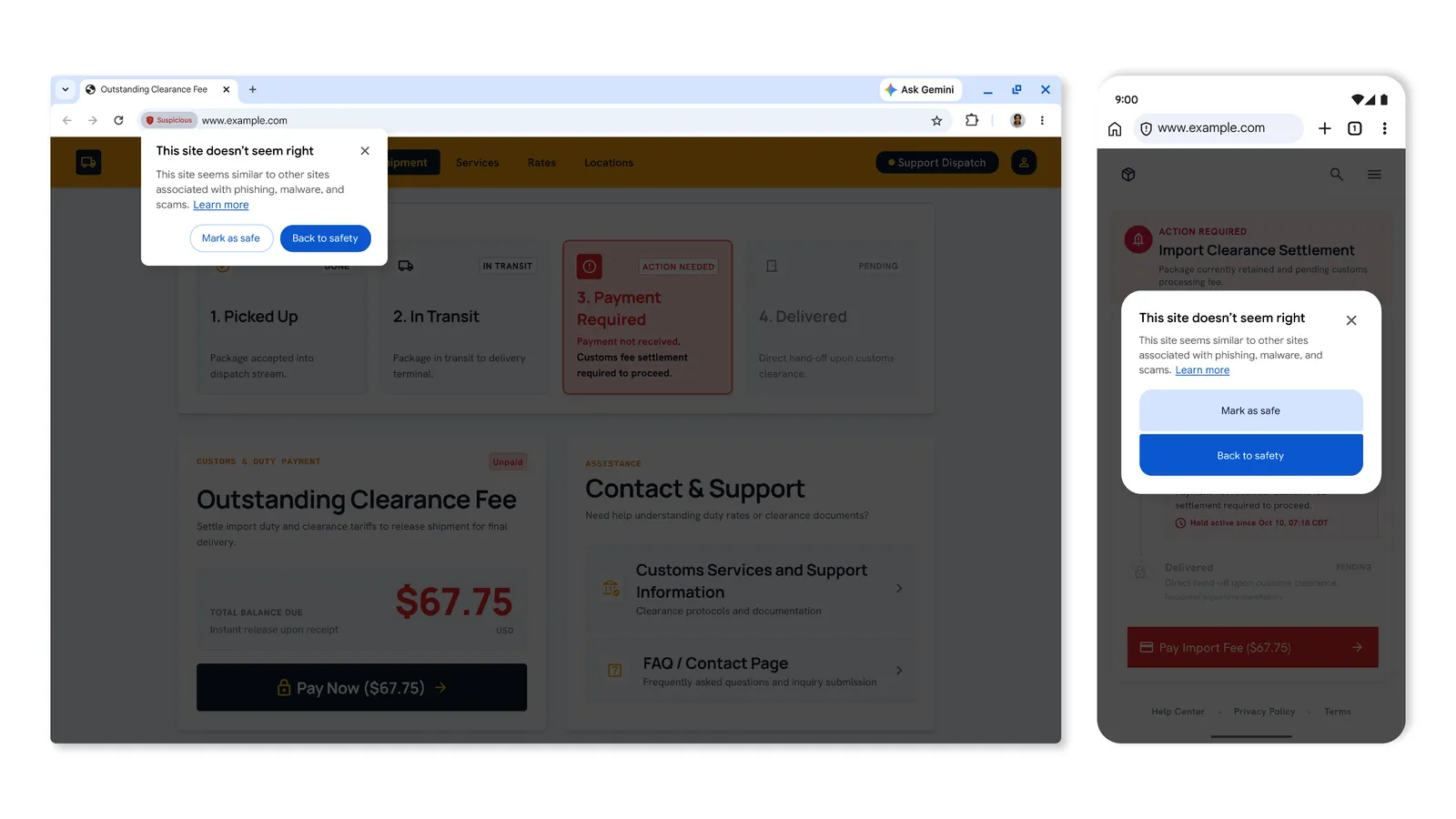
Why two levels: because a softer warning is less disruptive, Google says it can safely show more of them. That means you will likely see warnings on sites that never triggered one before. If you are sure a site is fine, “Mark as safe” lets you carry on.
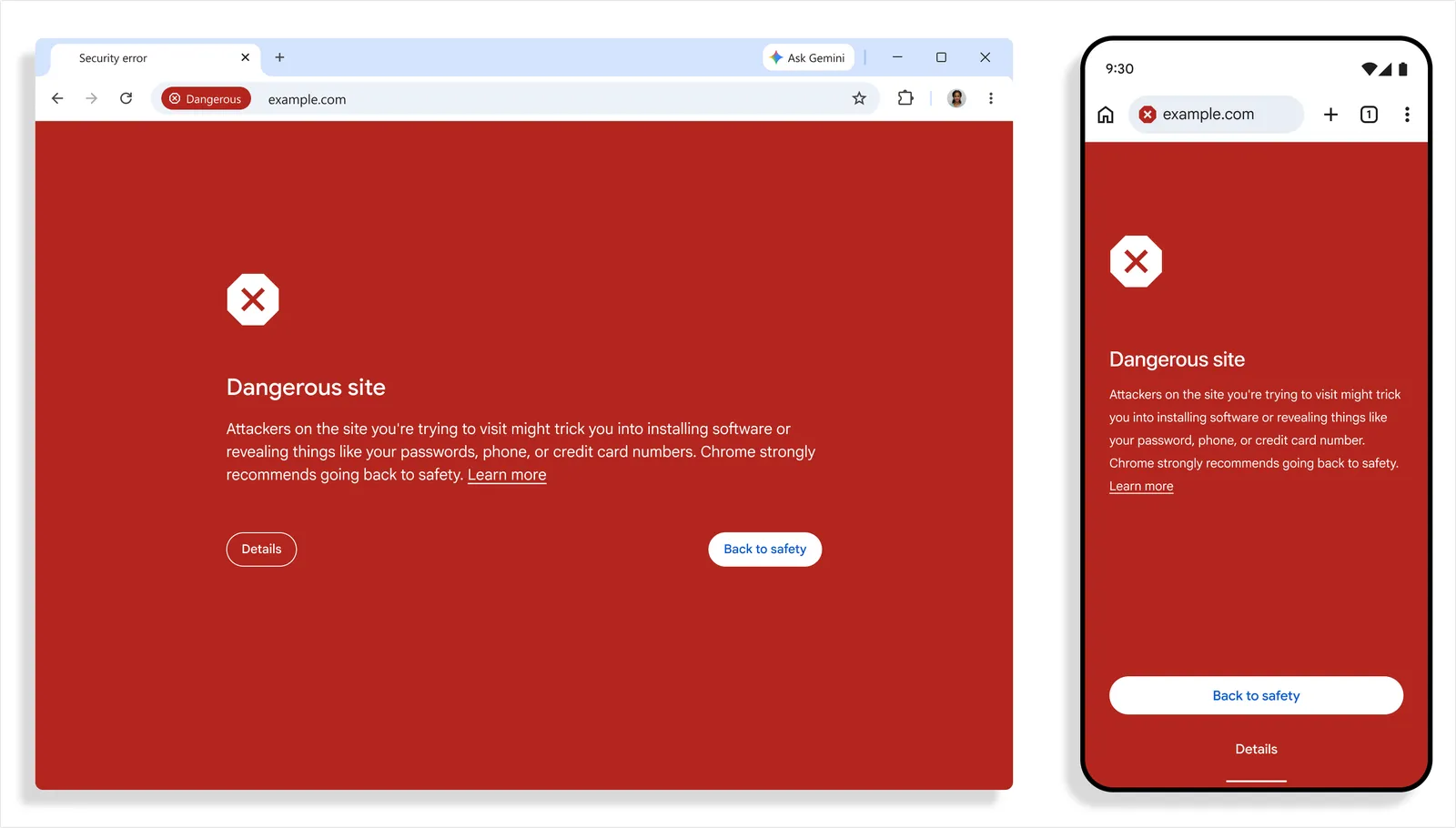
Dangerous sites: when Google is highly confident a page is malicious, nothing changes. You still get the full-page red warning you already know.
2. Gemini scam detection moves to the cloud
Last year: Chrome started using on-device Gemini (Gemini Nano) to catch tech support scams for Enhanced Protection users on supported devices. We covered that first version of Gemini Nano scam protection in Chrome when it launched.
Now: Google has switched to a more powerful server-side Gemini model. That expands the feature to everyone with Enhanced Protection turned on, not only people with a capable device, and widens it to more scam types, such as fake antivirus warnings and fake browser update pages.
How it decides: Gemini looks at the page content and judges which brand the page is pretending to be, what the page is trying to get you to do, and how likely it is to be a scam. Safe Browsing then combines that with the domain’s reputation and other security signals before making a final call.
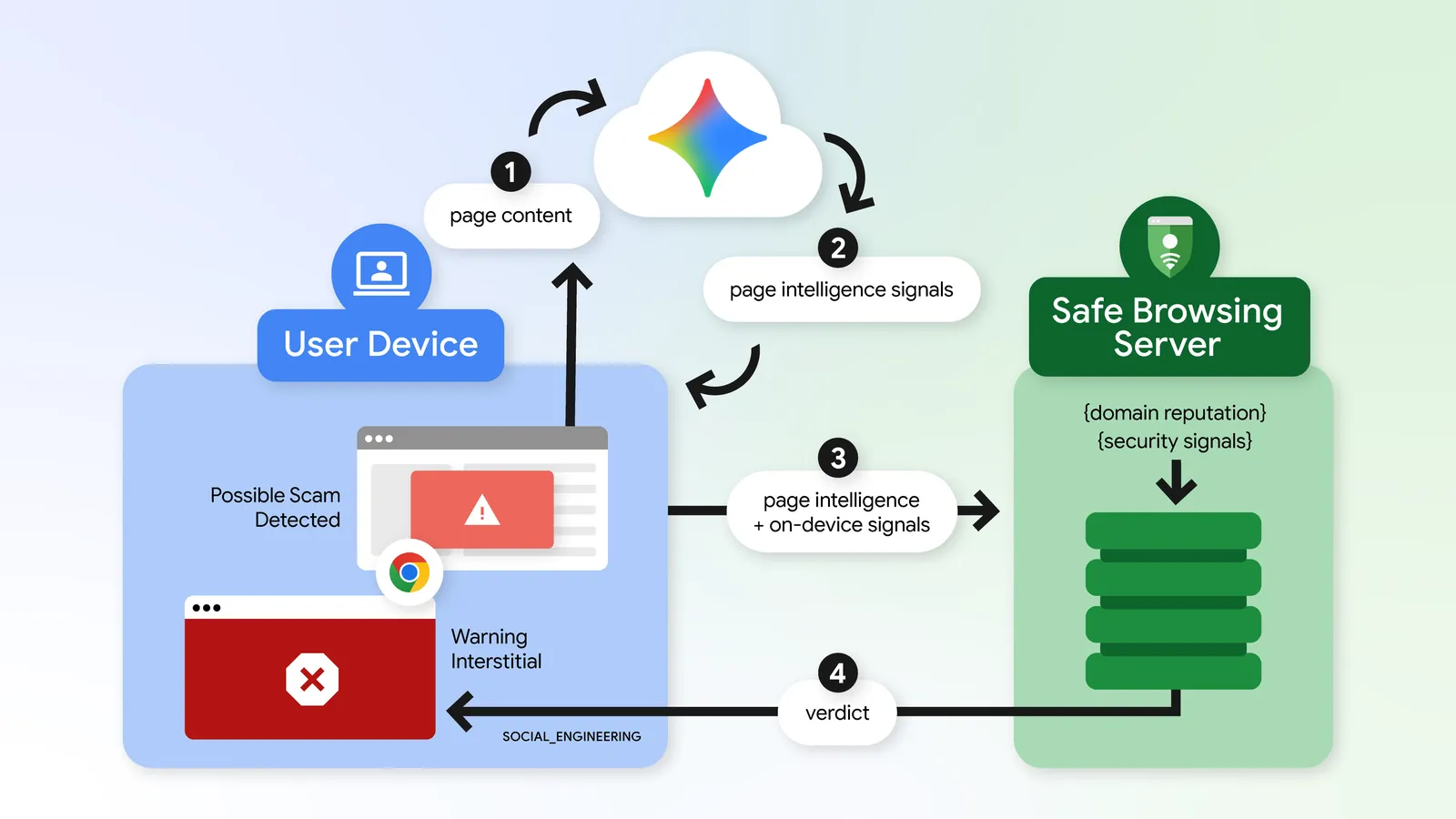
What about privacy? Google says Chrome only sends page text for analysis when a site already shows high-confidence scam signs. When content does leave your device, Google says it is processed ephemerally, which means it is never logged, kept or used to train models.
3. Chrome now spots ClickFix scams
What ClickFix is: a scam page shows a fake error, such as a broken browser update, and tells you to copy a command and paste it into a system tool to “fix” it. The command you paste is often not the one shown on screen.
Why it works for attackers: the command runs through built-in tools like PowerShell or cmd.exe on Windows. Security software trusts those tools, and because the malware download happens in the terminal instead of the browser, it skips Chrome’s normal download protection.
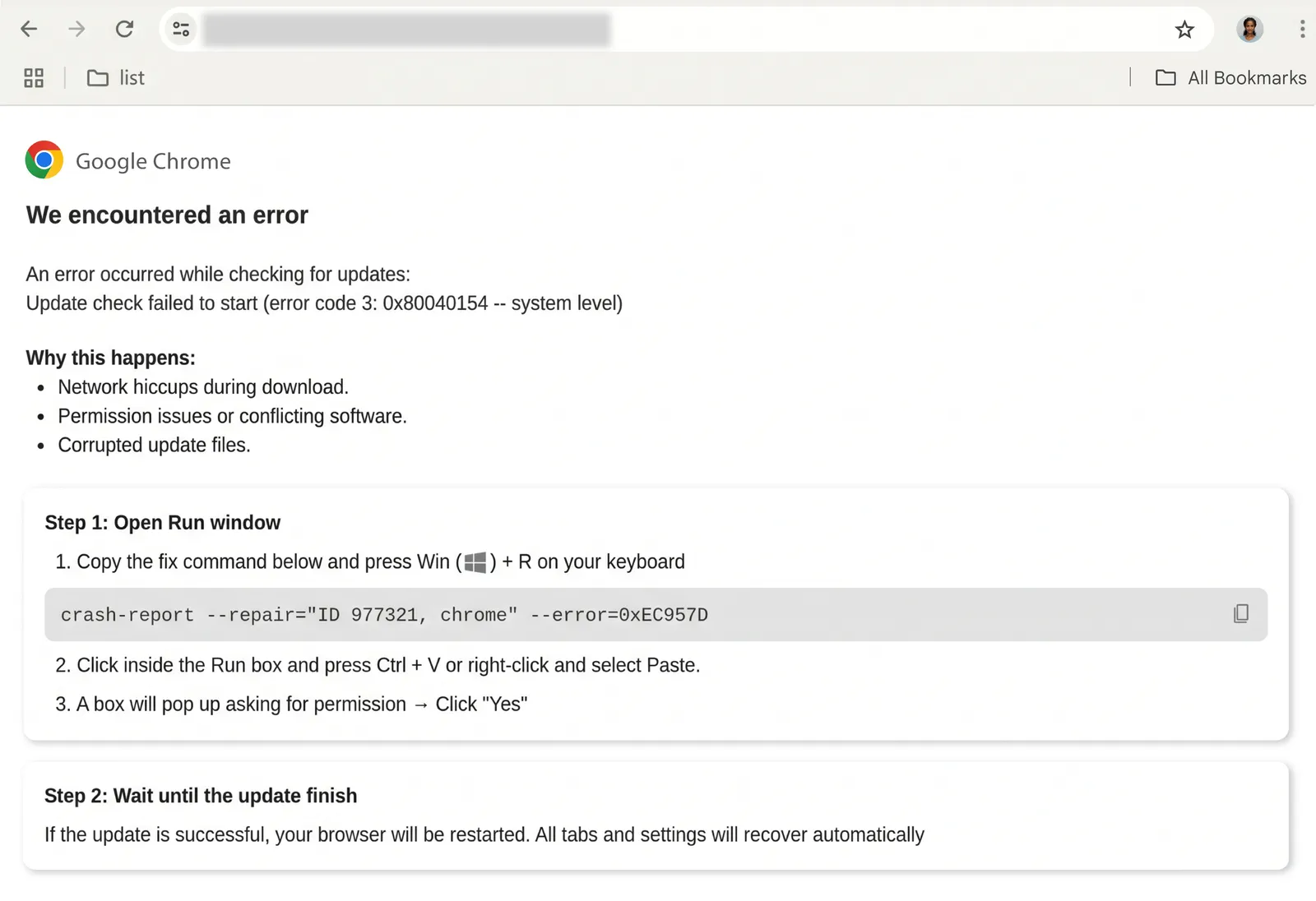
The fix: Chrome now notices when an Enhanced Protection user copies a suspicious command. It strips personal information from the copied text, sends it to Safe Browsing to check, and shows a warning if the verdict comes back dangerous. Google says it is built to be high precision, so developers copying normal commands should not be bothered.
On a Chromebook: ChromeOS has no PowerShell or Windows Run box, so the classic ClickFix trick is aimed mostly at Windows PCs. Google did not say which platforms get the ClickFix check. The simple rule works everywhere, though: no real website, and never Chrome itself, will ask you to paste a command to fix your browser.
How to turn on Enhanced Protection
On a Chromebook, Windows PC or Mac: the steps are the same in Chrome on all three, including Chromebooks and Googlebooks running ChromeOS.
- Open Chrome and select the three-dot More menu at the top right, then Settings.
- On the left, select Privacy and security, then Security.
- Under Safe Browsing, select Enhanced protection.
Shortcut: type chrome://settings/security into the address bar and press Enter to jump straight there.
On Android: open Chrome, tap the three-dot menu, then Settings > Privacy and security > Safe Browsing, and choose Enhanced protection.
Your Google Account: Google also recommends turning on Enhanced Safe Browsing for your Google Account, which extends the protection to Gmail and other Google services when you are signed in.
Is there a catch? Enhanced protection sends Google the URLs you visit and small samples of page content to check them in real time. Google says that data is used only for security, and it is the trade-off that makes features like these possible. Managed school or work Chromebooks may have this set by an admin.
Not sure which mode you are using?
Google’s help page explains the three Safe Browsing levels (Enhanced, Standard and No protection) and what each one sends to Google.
Read Google’s Safe Browsing guideOur take
The two-tier warning is the smartest part of this update. A full red page for every slightly odd site would train people to click past warnings, so a softer “this doesn’t seem right” nudge makes sense. Moving Gemini to the cloud also brings scam checks to cheaper Chromebooks that could never run the on-device model. Take the “ten times safer” claim with a pinch of salt, though: Google’s footnote says it is based on how many warnings Enhanced Protection users see compared with Standard users, not on how many people actually avoided a scam. 9to5Google has more on the rollout.
Want another quick scam check? Read: How Circle to Search can check if a text message is a scam.
Discover more from Chrome Geek
Subscribe to get the latest posts sent to your email.