Gemini Gets a Small Business Hub With Brand Kits, Finance Help and New Apps
 by
Sophie Sullivan
October 20, 2026
by
Sophie Sullivan
October 20, 2026
Google is giving Gemini a home base for small business owners. A new business landing page puts branding, finances, customer insights and marketing in one place, and Gemini can now remember your brand’s look and plug into apps like Shopify, Canva and Google Ads. Google says the tools start rolling out globally in the coming days to all Gemini app users, not just paid subscribers.
1. A business landing page inside Gemini
What it is: Google calls it a central hub where owners can build their brand, analyze finances, understand customer insights and more. In its announcement, Google says tens of millions of small business owners already use Gemini to brainstorm products, manage customer feedback and analyze how their business is doing.
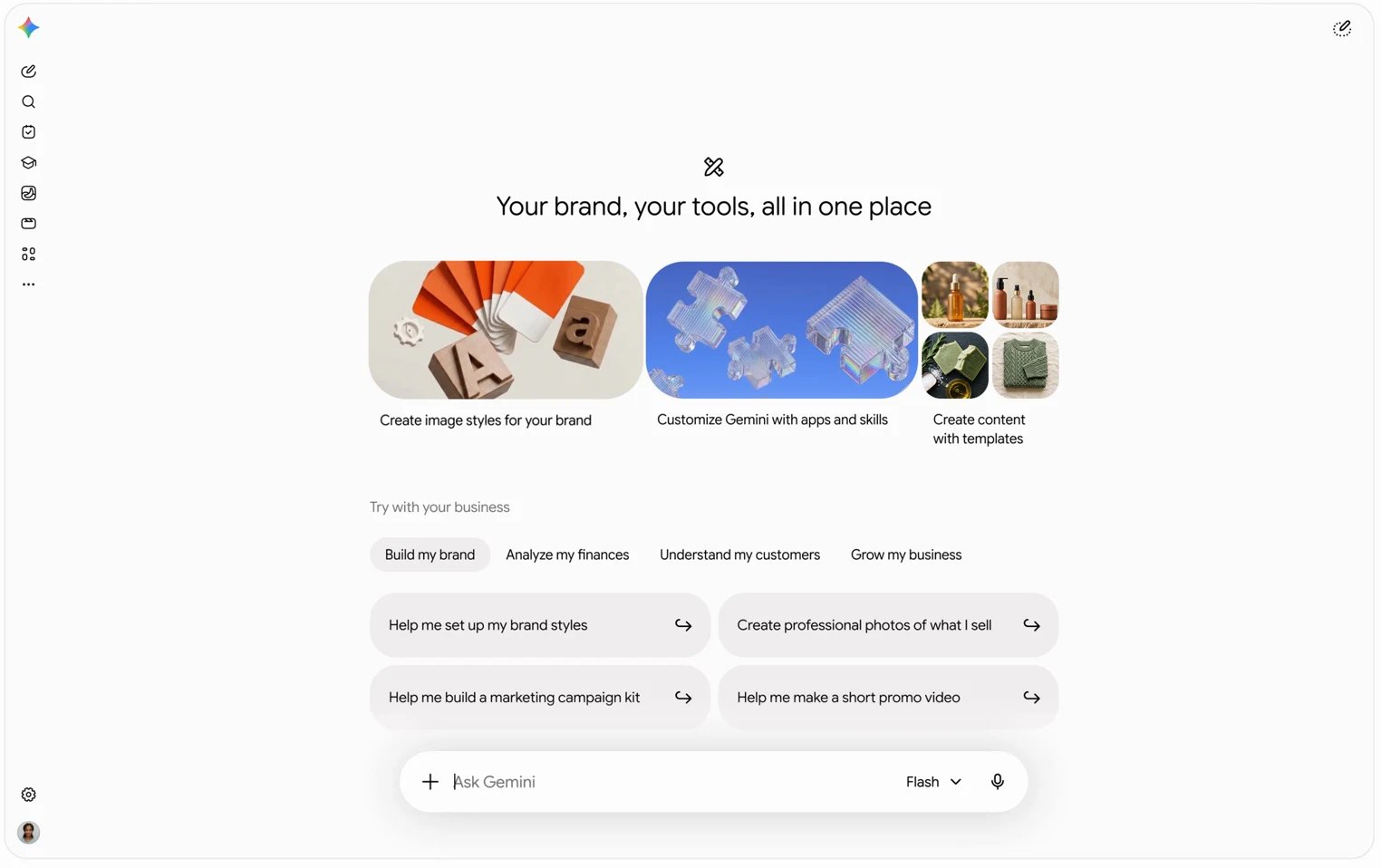
How it works: in Google’s demo, the page opens with three cards (create image styles for your brand, customize Gemini with apps and skills, and create content with templates). Below them, four tabs offer ready-made prompts: Build my brand, Analyze my finances, Understand my customers and Grow my business. Examples include “Help me build a marketing campaign kit” and “Help me reply to my recent customer reviews”.
Skills are part of it: Google says the rollout includes new marketing and finance skills. If skills are new to you, our explainer on how Gemini Gems are becoming skills covers what they are.
2. Connect the apps your business already uses
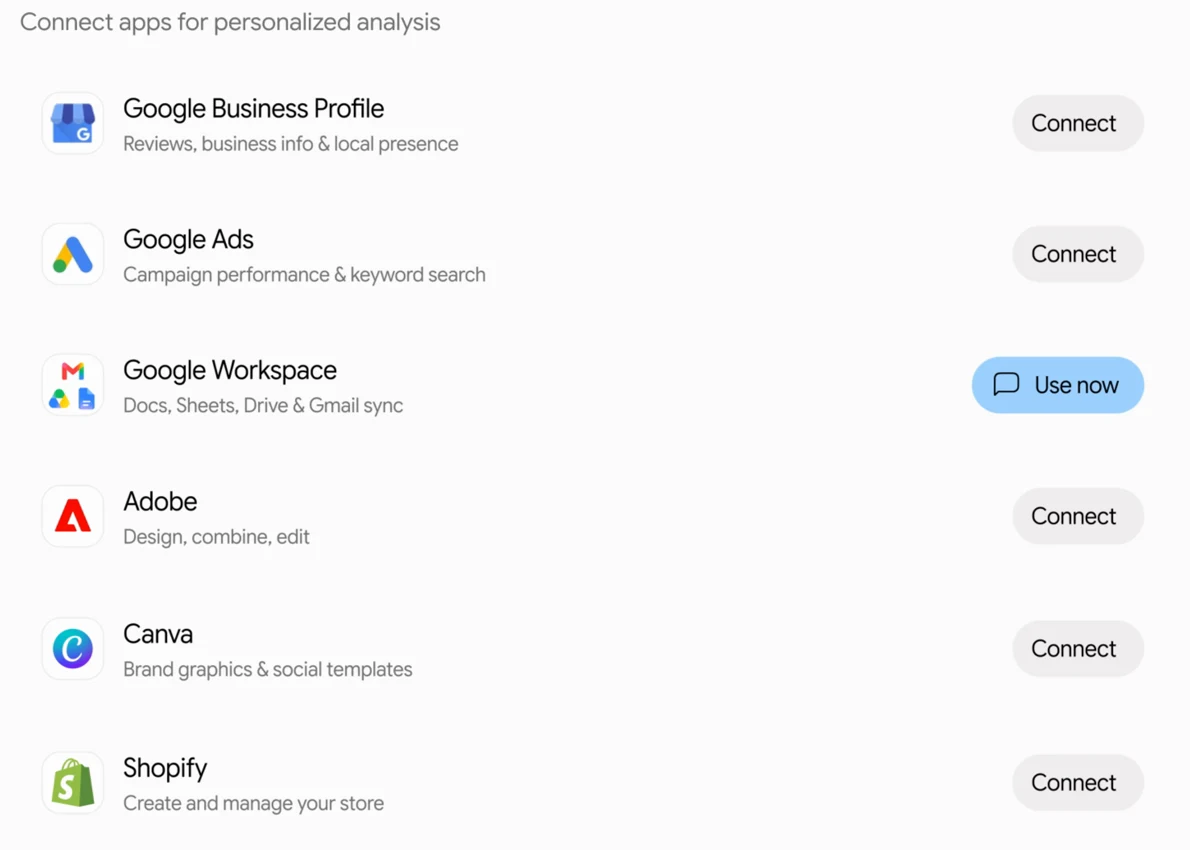
Google apps: Gemini can now link to Google Business Profile, Google Ads and Google Workspace, so it can look at your reviews, ad campaigns, and files in Docs, Sheets, Drive and Gmail.
Third-party apps: Google also lists Adobe, Canva, Dropbox, Shopify, Wix, Zoho and Xero as connected apps for this rollout. That covers design, file storage, online stores, website builders and accounting.
3. Gemini remembers your brand’s look
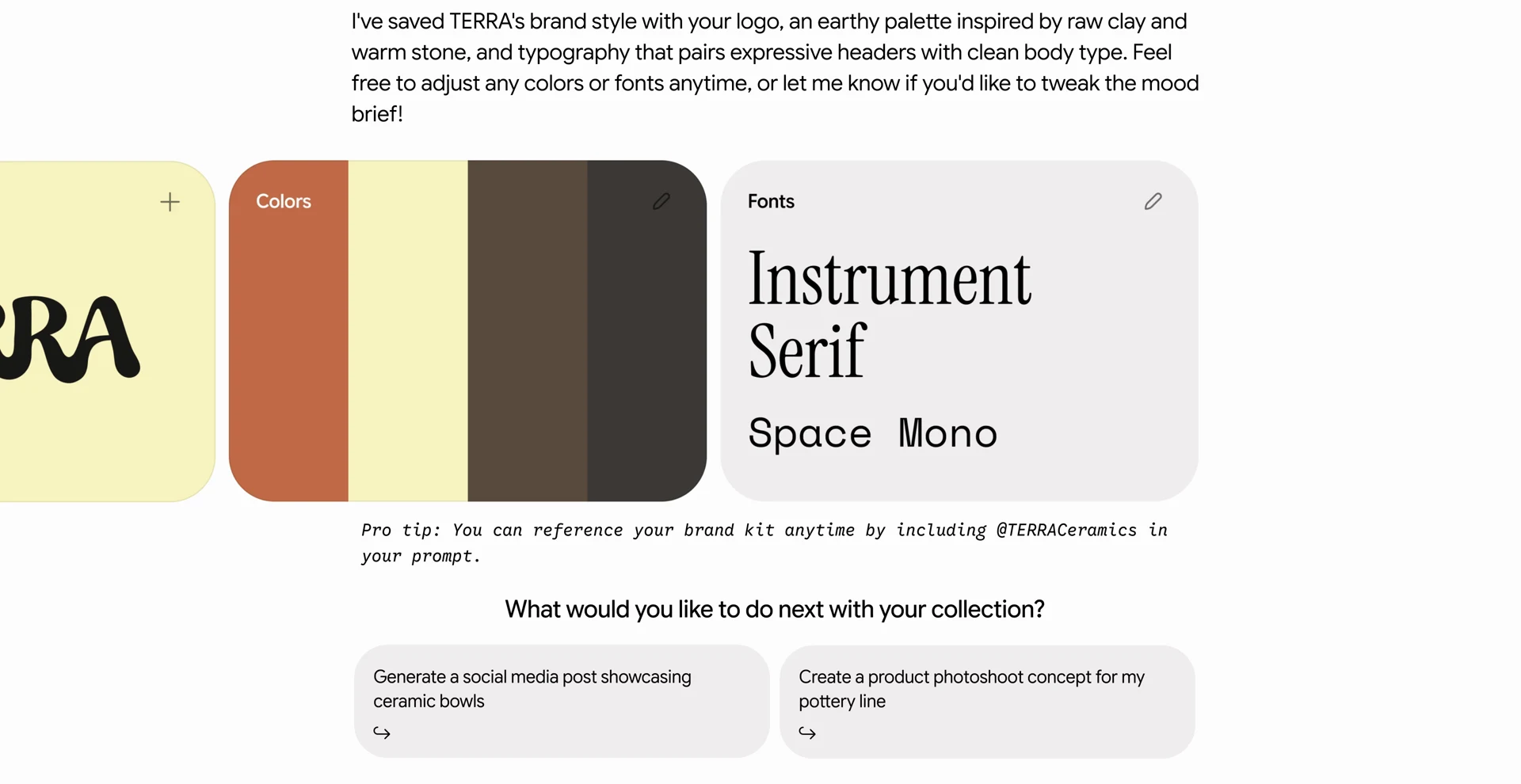
Upload once: you can define a brand style by uploading your website, brand kit, fonts or colour palettes. Gemini keeps that style, so you do not have to upload your guidelines again every time you ask for a new graphic.
Powered by Nano Banana 2.1: Google pairs the saved style with Nano Banana 2.1, its latest image model, for full visual sets for product launches or ongoing campaigns. In the demo, Gemini saves a ceramics brand’s logo, colours and fonts as a kit you can call up later by typing an @ mention of the brand in your prompt.
Video too: one of the demo prompts is “Help me make a short promo video”. If video is your thing, Google already offers free HD video creation with Gemini in Google Vids.
4. Turn messy numbers into charts
What it does: Gemini can turn messy spreadsheets, receipts and purchase records into clear financial graphics and interactive models in seconds. The idea is that you ask questions about your money in plain language instead of digging through rows of numbers.
A word of caution: Gemini still shows its usual “Gemini is AI and can make mistakes” note. Use the charts as a starting point and double-check any figure before it goes into your taxes or a loan application.
Who gets it, and real businesses already using Gemini
Availability: Google says the business landing page, the marketing and finance skills and the new connected apps begin rolling out globally in the coming days for all Gemini app users. Larger companies that need admin controls and enterprise security are pointed to Gemini Enterprise instead.
Real examples: Google shared stories from owners around the world. A ceramicist in Bordeaux, France, uses Gemini for product descriptions, newsletters and social posts and says it saves her two to three hours a day. A burger and butcher shop owner in New Jersey uses Gemini with a connected Google Business Profile to track local search and Maps performance between shifts.
Why it matters on a Chromebook
Works in the browser: Google’s demo shows the hub in the desktop web version of Gemini, which is exactly what you use in Chrome on a Chromebook or Googlebook. Since many small shops already run on Gmail, Docs and Sheets, the Workspace connection fits right into a Chromebook setup.
Mind your data: connecting Shopify, Xero or Google Ads gives Gemini access to sales and money data. Only link the apps you actually need, and check which account you are signed in with first.
Our take: this is less about new AI tricks and more about packaging. The saved brand style is the standout, because re-uploading logos and colours every time is one of the most annoying parts of using AI for marketing. Making it free for all Gemini users is a smart move against ChatGPT and other AI assistants. We will check how the hub looks once it reaches our accounts.
Want Gemini’s strongest model too? Read our guide: How to Use Gemini 4 Argon on a Chromebook, Googlebook or in Chrome.
Discover more from Chrome Geek
Subscribe to get the latest posts sent to your email.