AgentCloak Swaps Your Private Details for Fakes Before AI Chatbots See Them
 by
Sophie Sullivan
Post Updated: October 20, 2026
by
Sophie Sullivan
Post Updated: October 20, 2026
Pasting an email, a contract or a form into an AI chatbot is handy, but it also hands over names, addresses and account numbers. AgentCloak, a free extension from data residency company InCountry, tries to fix that by swapping your private details for realistic fakes before your prompt leaves Chrome. Its launch video on X, posted by AgentCloak CEO Peter Yared on September 18, has passed about 2.3 million views, and the tool is now drawing fresh attention.
What AgentCloak does
The problem it targets: many people already edit prompts by hand, changing names and leaving out numbers before asking ChatGPT or Claude for help. The catch is that the answer gets less useful when the AI is missing context. AgentCloak’s pitch is that you keep the context but lose the real data.
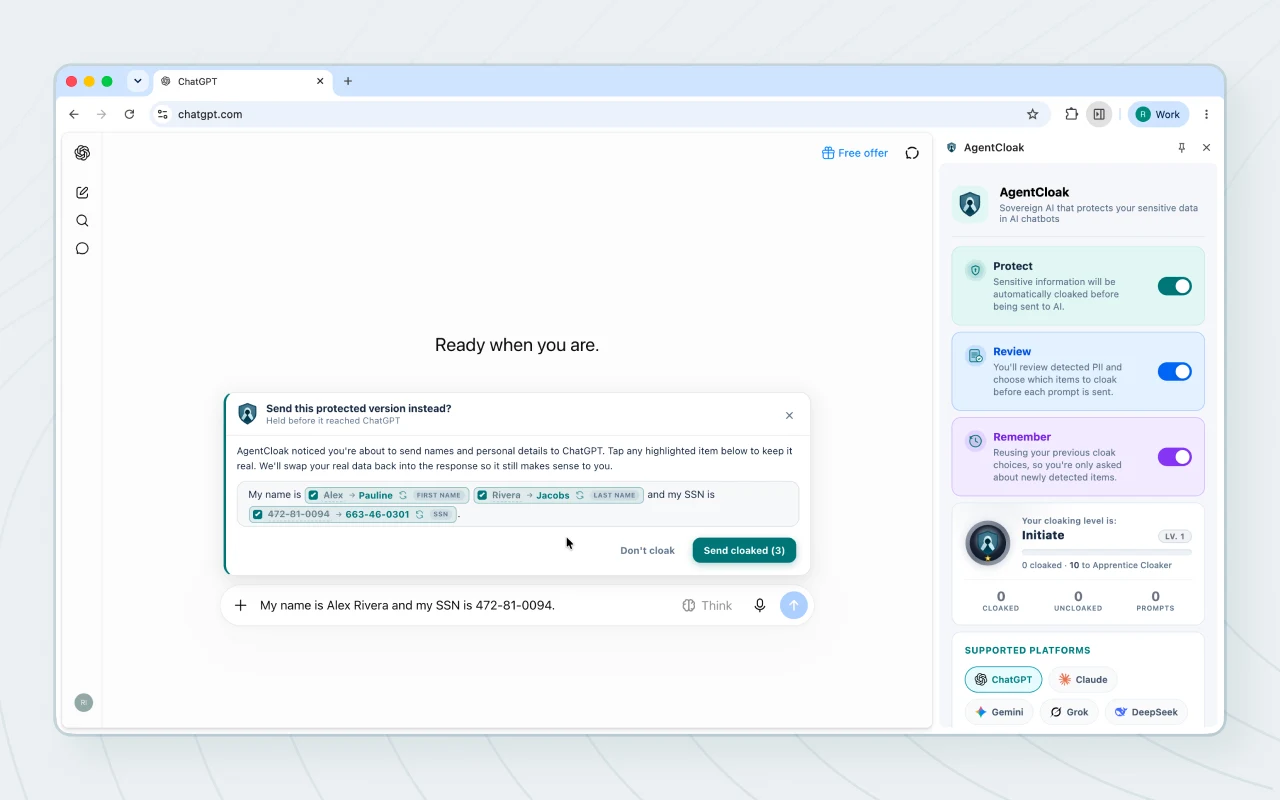
Realistic stand-ins: according to InCountry’s Business Wire announcement, AgentCloak uses consistent “digital twins”. Its example: “Peter Parker” becomes “Julio Schmidt” and “364 23rd St” becomes “401 Vanessa Curve”. The chatbot works with the fake details, and the same fakes are used every time, so a longer chat still makes sense.
What it detects: the Chrome Web Store listing lists names, phone numbers, email addresses, Social Security numbers, credit cards, bank account, routing and tax IDs, government IDs, passports, driver’s licenses, street addresses, IP addresses and URLs.
Languages: English, Spanish, French, German, Italian, Portuguese and Dutch. The listing says names in non-Latin scripts, such as Chinese, Japanese, Korean, Arabic or Cyrillic, are out of scope.
How it works
Step 1, you type: as you write a prompt, a small AI model running inside your browser looks for private data. The model is Rampart, a compact detection model from the U.S. government’s National Design Studio, which AgentCloak pairs with its own rules.
Step 2, you review: AgentCloak pops up a “Send this protected version instead?” box that highlights each item and its replacement. You can untick anything you want to keep real, then choose Send cloaked or Don’t cloak.
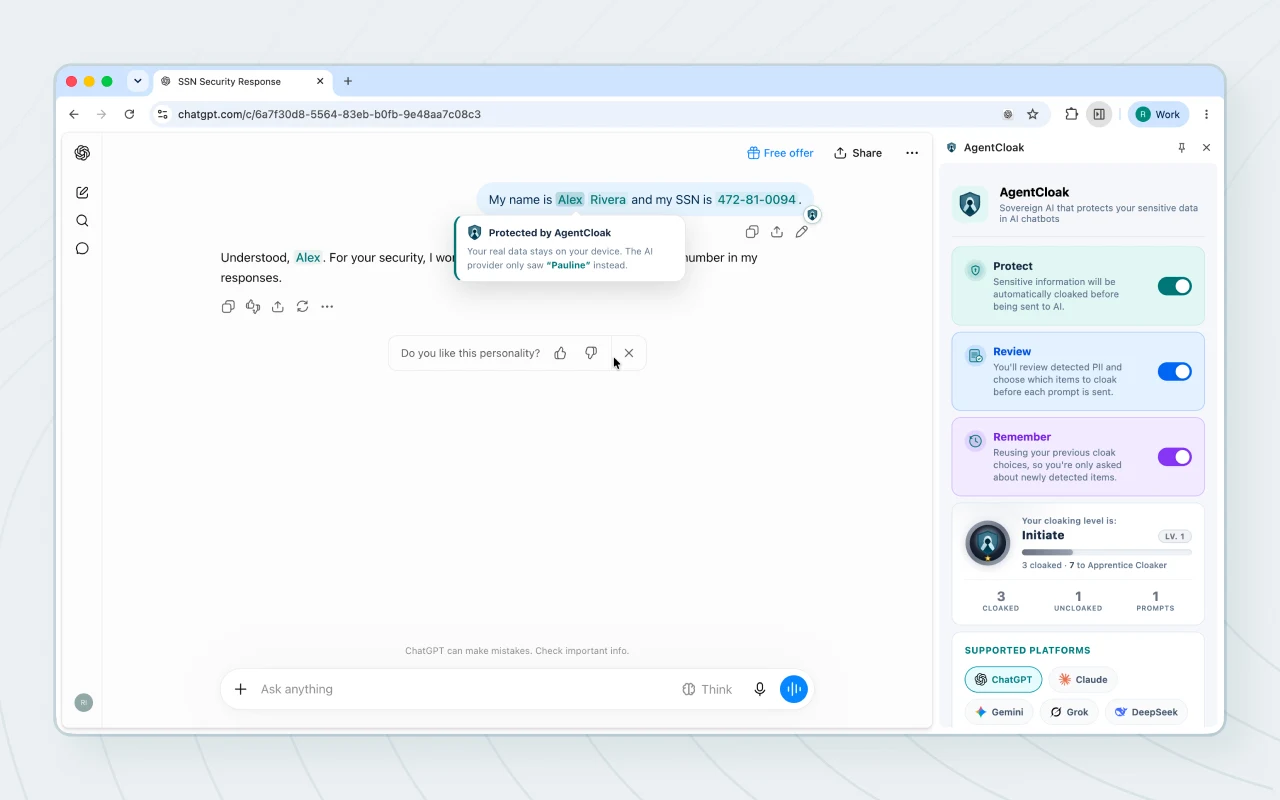
Step 3, the reply comes back: the chatbot only sees the stand-ins. When it answers, AgentCloak swaps your real details back in on your screen, so the reply reads normally to you.
Side panel controls: the official screenshots show three switches in the side panel: Protect (cloak automatically), Review (check each item before sending) and Remember (reuse earlier choices so you only get asked about new items).
Supported chatbots and devices
On a Chromebook: nothing special is needed. The listing has no platform limits, and the extension runs its detection model inside Chrome, so it should work on any Chromebook that runs current Chrome. Expect the first check to be a little slower on low-end models, since the model runs on your own device.
On a Googlebook: Google’s developer docs say Googlebook OS supports the same extension platform as ChromeOS, with some differences in how extensions run. AgentCloak should install, but we have not confirmed how well it performs. If you are still choosing hardware, our Intel vs Snapdragon Googlebook guide explains why the chip matters.
Beyond Chrome: InCountry says AgentCloak is also available for Safari and Edge, and as a desktop app for Mac and Windows for people who use desktop chatbot apps.
What permissions it asks for
Small list: we checked the extension’s manifest (version 1.1.3). It requests storage (to save your settings and choices), offscreen (a hidden page where the detection model runs) and sidePanel (for its control panel).
Site access: it can only run on the chatbot sites listed above, plus two Microsoft 365 Copilot addresses. It does not ask to read every website, your browsing history or your tabs.
Model on board: the download is about 24 MB because the detection model ships inside the extension. That fits the claim that detection happens on your device, but a look at the package is not a security audit.
What the privacy policy says
The developer’s promises: the listing says processing is 100% on your device, your sensitive data is never sent to AgentCloak or any server, and there is no account, login or tracking. InCountry’s announcement adds that this is not a retention or “we won’t train on your data” promise, because the chatbot is never sent the real values in the first place.
Chrome Web Store disclosure: the developer declares that AgentCloak handles personally identifiable information, personal communications and website content, which makes sense for a tool that reads your prompts. It also declares that this data is not sold or used for unrelated purposes.
The policy itself: the listing links to InCountry’s general privacy policy (effective May 28, 2026). It covers InCountry’s website and services in general, and we could not find a section written specifically for AgentCloak. If you need that detail, ask the developer through the store listing before you rely on it for sensitive work.
Treat it as an extra layer, not a shield
No detection model catches everything, and AgentCloak says so itself: it calls the tool harm reduction, not a guarantee, and asks you to review sensitive messages before sending. The Review switch is the safest way to use it.
View AgentCloak on the Chrome Web StoreWho should try it
Good fit: students pasting in essays with personal details, freelancers sharing client emails, and anyone who already uses AI chatbots daily and wants a safety net. It is free, and it costs nothing in setup beyond installing it and pinning the side panel.
Think twice: if your job has strict rules about what can go into AI tools, check with your IT team first. AgentCloak is still young, with 689 users and four ratings on the Chrome Web Store when we checked. It also works alongside tools like the ChatGPT Chrome extension, but test it before trusting it with anything that matters.
Our take: AgentCloak tackles a real problem with a smart idea, and its permission list is refreshingly small. Its privacy promises are the developer’s own and have not been checked by an outside auditor, so use the Review mode and keep an eye on what it catches.
Looking for more? See our picks for the Best AI Extensions for Chrome, Best Chrome Extensions for Students and Best Chrome Extensions Worth Installing.
Discover more from Chrome Geek
Subscribe to get the latest posts sent to your email.