Gmail’s iPhone Redesign Is Getting Backlash: What Changed and How to Live With It
 by
Sophie Sullivan
October 20, 2026
by
Sophie Sullivan
October 20, 2026
If Gmail on your iPhone suddenly looks greyer, rounder and a bit unfamiliar, it is not your imagination. Google is rolling out a new look for the Gmail app on iOS, first spotted by Dutch site iPhoned in version 6.0.260928. Google has not announced it, and on X the reaction has been loud, with many users asking how to go back.
What changed in Gmail for iPhone
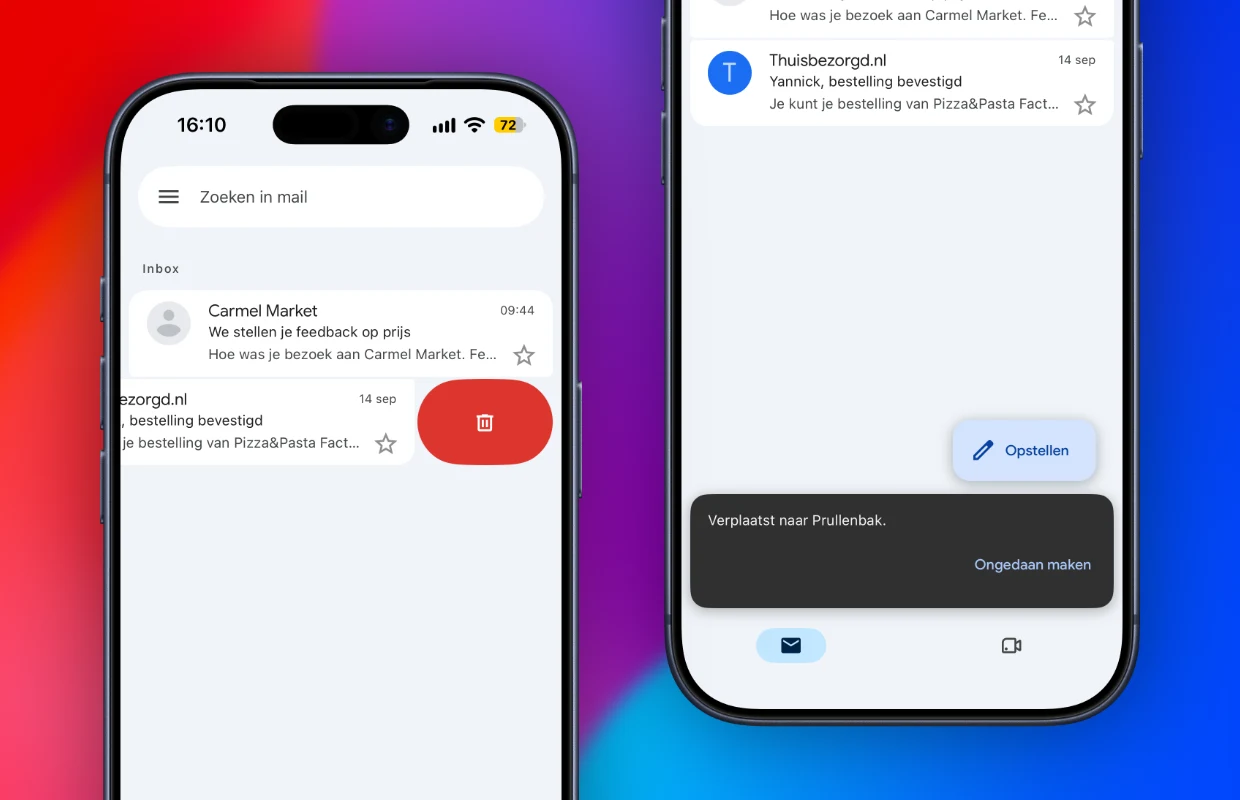
A grey inbox: your inbox is no longer plain white. iPhoned describes a grey backdrop with the emails sitting on white cards on top. The layout itself is the same, with the same tabs and the same order.
New motion: the loading symbol is now a circle with a small kink in it, and swiping an email left or right shows a new, rounder animation. In iPhoned’s screenshots, the delete action appears as a rounded red pill.
Restyled buttons and icons: under each email you now see three dark blue buttons for reply, forward and a quick response. iPhoned says they do the same jobs as before. Fonts and symbols across the app also look different.
Compose still floats: the Compose button still sits in the bottom right corner, now as a soft, rounded pill that fits the new style.
Which version: iPhoned tied the new look to version 6.0.260928, which the App Store lists as released on October 5. Two newer builds, 6.0.261005 and 6.0.261012, followed on October 12 and 19. All three come with the same generic note: “Bug fixes and performance improvements.”
Why you may not have it yet: iPhoned says big Gmail changes can take days or weeks to reach everyone after you install the update. Some people on X say the design showed up and then disappeared again, which suggests Google is still switching it on and off for different groups of users.
What people are saying on X
“Nuked”: on October 19, X user Daniel Kuntz asked whether there is an email app that doesn’t suck, saying Google “nuked iOS Gmail in the latest update.” The post passed 24,000 views and 77 replies, many of them suggesting Apple Mail, Spark or Fastmail instead.
Read vs unread: one of the most common complaints is contrast. One user called the update a disaster because they can barely tell read and unread emails apart, especially in dark mode.
Red on red: another user posted a screenshot of the side menu where the selected Primary label shows dark red text on a red highlight, which is hard to read.
Not everyone hates it: one iPhone user said they love the redesign apart from the loading animation, which they compared to a high school PowerPoint slide transition. Another liked the cleaner look, with bigger rounded corners and a fun bubble animation when swiping, then found it gone the next day and wanted it back.
Want changes? Send feedback from the app
Google often adjusts designs during a staged rollout. If the new look makes Gmail harder to use, say exactly what is wrong (for example read and unread contrast) using Help & feedback in the Gmail menu, or post in the Gmail Help Community.
Open the Gmail Help CommunitySettings that make the new look easier
Make unread mail stand out: if read and unread emails now blur together, switch your inbox type. In Gmail, tap Menu, then Settings, then Inbox type, and choose Unread first. Google’s inbox layout help page says this splits your inbox into Unread and Inbox sections. Important first, Starred first and Priority Inbox are also there.
Pick your swipe actions: if the new swipe animation makes you nervous about deleting the wrong thing, change what each swipe does. Go to Settings, Inbox customizations, Mail swipe actions, and set Right swipe and Left swipe separately. Per Google’s settings help page, you can choose Archive, Trash, Mark as read/unread, Snooze, Move to, or None.
Sender images or checkboxes: turn off Show Sender Images in Settings if you would rather see simple checkboxes instead of profile pictures. Google’s help page also lists Hide bottom navigation, which hides the bottom bar as you scroll so you see more mail.
Density and theme: Gmail for iPhone has also offered a Conversation list density option (Default, Comfortable or Compact) under Inbox customizations, according to Pocket-lint’s settings guide. Older guides also describe a Theme option with Light, Dark and System default. Google’s current help page does not list either one, so names may vary in your version. Switching from dark to light theme is worth a try if the grey cards are hard to read at night.
What you cannot do: there is no setting to bring back the old design, and the App Store does not let you install an older version of Gmail. If you really cannot get along with it, Apple’s Mail app on iPhone can also be set up with a Gmail account.
How it compares with Android and Chromebook
Android got there first: the changes iPhone users describe closely match what Gmail on Android got with Google’s Material 3 Expressive redesign in 2025. As 9to5Google reported, Android now puts each email in its own container, uses bubbly swipe animations and shows prominent Reply and Forward buttons. In other words, Google is bringing the iPhone app in line with Android.
Chromebook is untouched: on a Chromebook or Googlebook, Gmail runs in Chrome, and iPhoned notes the desktop version has not changed. In Gmail on the web you still get full control over the look in Quick settings, including theme and density. Our Gmail keyboard shortcuts cheat sheet will help you get through mail faster there.
A note on the table: on Android, Google’s help page lists only Default and Priority Inbox as inbox types.
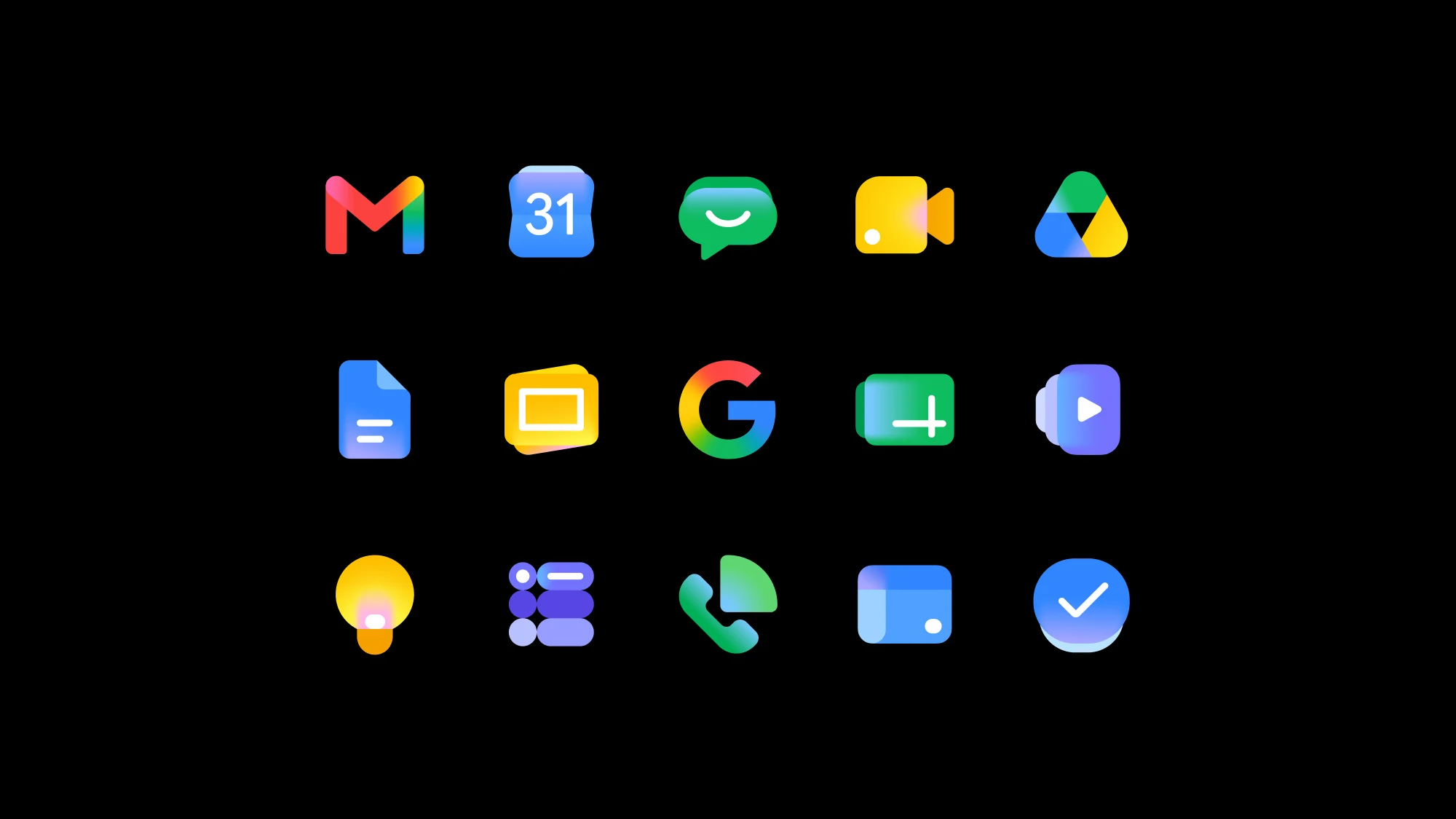
Part of a bigger refresh: iPhoned links the app’s new look to Gmail’s new logo. Google introduced its gradient Workspace icons in a Workspace Updates post in May 2026, and now the inbox itself is catching up.
Our take: the new Gmail for iPhone is mostly a coat of paint, not a feature change, which is why the backlash centres on contrast and readability. Until Google tweaks it, switching to Unread first and setting your own swipe actions are the quickest ways to make it feel like yours again.
Discover more from Chrome Geek
Subscribe to get the latest posts sent to your email.