Chrome 156 Security Update Fixes 52 Bugs, 4 of Them Critical
 by
Sophie Sullivan
Post Updated: October 28, 2026
by
Sophie Sullivan
Post Updated: October 28, 2026
Google has pushed a new Chrome 156 update with 52 security fixes, and four of them are rated Critical. According to Google’s Stable Channel update note, the new build is 156.0.8078.73/.74 for Windows and Mac and 156.0.8078.73 for Linux, rolling out over the coming days and weeks. Chrome for Android got the same version on the same day.
1. What this update fixes
A big batch: 52 fixes is a lot for a mid-cycle patch. For comparison, the last Chrome 155 patch we covered fixed 10 bugs. This one lands a week after Chrome 156 arrived with talk to type, so there are no new features here, only fixes.
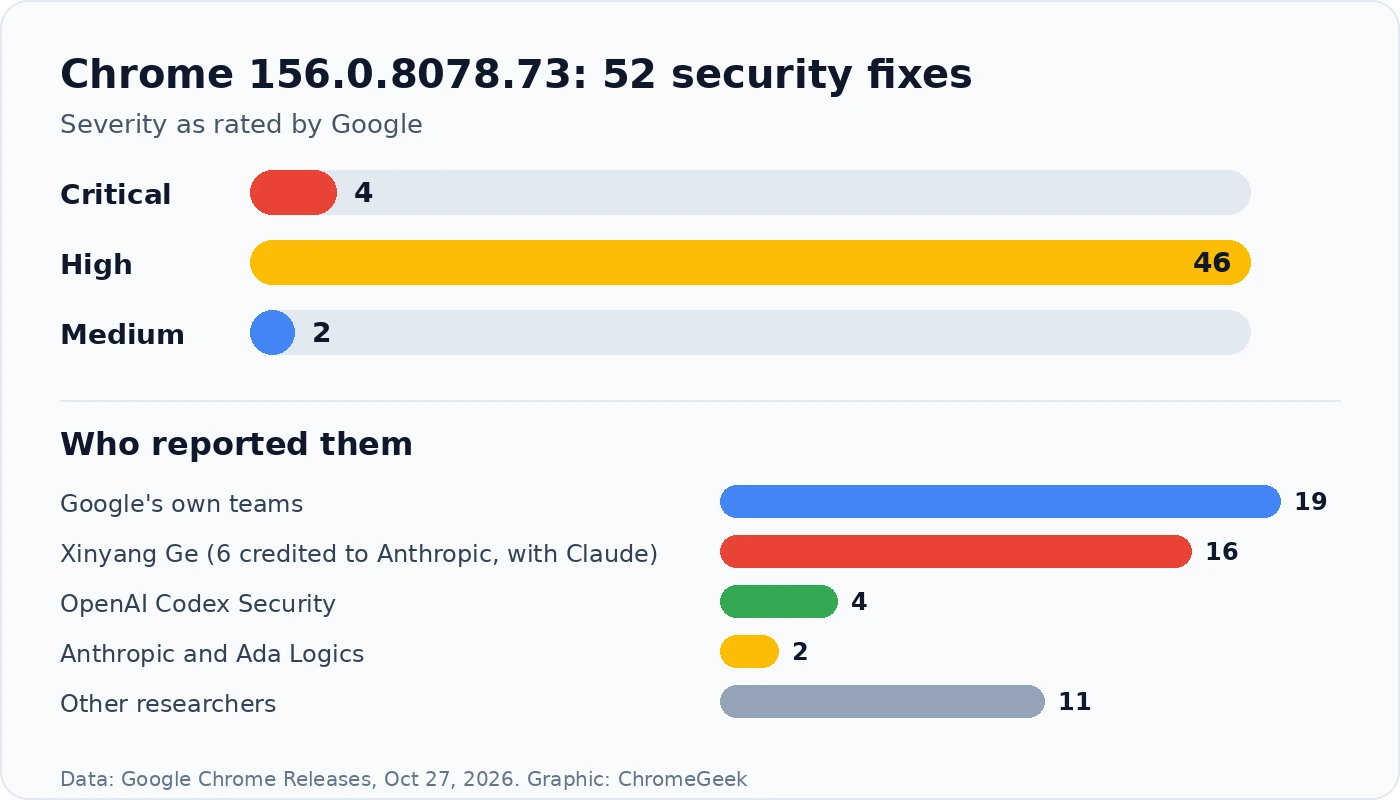
The four Critical bugs: Critical is Google’s top rating, used for bugs that could let an attacker run code on your device just because you opened a bad web page. These four are in FileSystem, FileAPI, the Skia graphics library and page Layout.
The rest: 46 High bugs touch almost every part of the browser, including the V8 JavaScript engine, Skia, SVG images, the PDF viewer, WebRTC calls and WebAudio. The two Medium bugs are in Paint and Animation. As usual, Google is keeping the bug details private until most people have updated.
2. AI tools are now finding Chrome bugs
The standout detail: a big share of this patch came from AI-assisted research. Security researcher Xinyang Ge reported 16 of the 52 bugs, including all four Critical ones. Six of those are credited to Anthropic, with help from its Claude model. Anthropic and the security firm Ada Logics are credited with two more, and OpenAI’s Codex Security tool reported four.
Google’s own share: Google’s internal teams found 19, and other outside researchers, plus Mozilla, found the remaining 11.
Why it matters to you: AI tools that can read code and spot weak points are finding bugs faster than before, which means more fixes and bigger patch lists like this one. That is good news as long as you install the updates quickly, because attackers can use the same kind of tools.
3. Which version you should have
Chromebooks: Chrome on a Chromebook updates with ChromeOS itself. The last ChromeOS Stable update on October 20 moved Chromebooks to ChromeOS 156 with browser 156.0.8078.42, and Google has not posted a newer Stable build with these fixes yet. Google usually follows desktop security patches with a ChromeOS update, so watch for one soon.
Googlebooks: Chrome on a Googlebook updates through the Play Store, and Chrome 156 for Googlebook is still rolling out. Google has not said which Googlebook build carries these fixes, so keep Chrome updated there too.
4. How to update Chrome now
- Windows, Mac and Linux: open Chrome, click the three-dot menu, then Help > About Google Chrome. Chrome checks for the update and downloads it.
- Click Relaunch when it appears. Your open tabs come back after the restart, but save anything you are typing first.
- Android: open the Play Store, search for Chrome and tap Update if you see it.
- Chromebook: go to Settings > About ChromeOS > Check for updates. If nothing new shows up yet, check again in a few days.
Not showing yet? Google rolls Chrome updates out in waves, so it can take a few days to reach everyone. Checking the About page usually pulls it in sooner.
Our take
There is nothing exciting to try in this update, but it is one you should not put off. Four Critical bugs in one patch is a lot, and the growing role of AI bug hunters means these big fix lists are likely to become normal. Open the About page, let Chrome restart, and you are done. Chromebook owners just need to keep an eye out for the matching ChromeOS update.
Missed the last Chrome patch? Here is what the Chrome 155 security update fixed.
Discover more from Chrome Geek
Subscribe to get the latest posts sent to your email.