Chrome 158 Beta Lets Websites Add Their Own App Install Buttons
 by
Sophie Sullivan
Post Updated: October 29, 2026
by
Sophie Sullivan
Post Updated: October 29, 2026
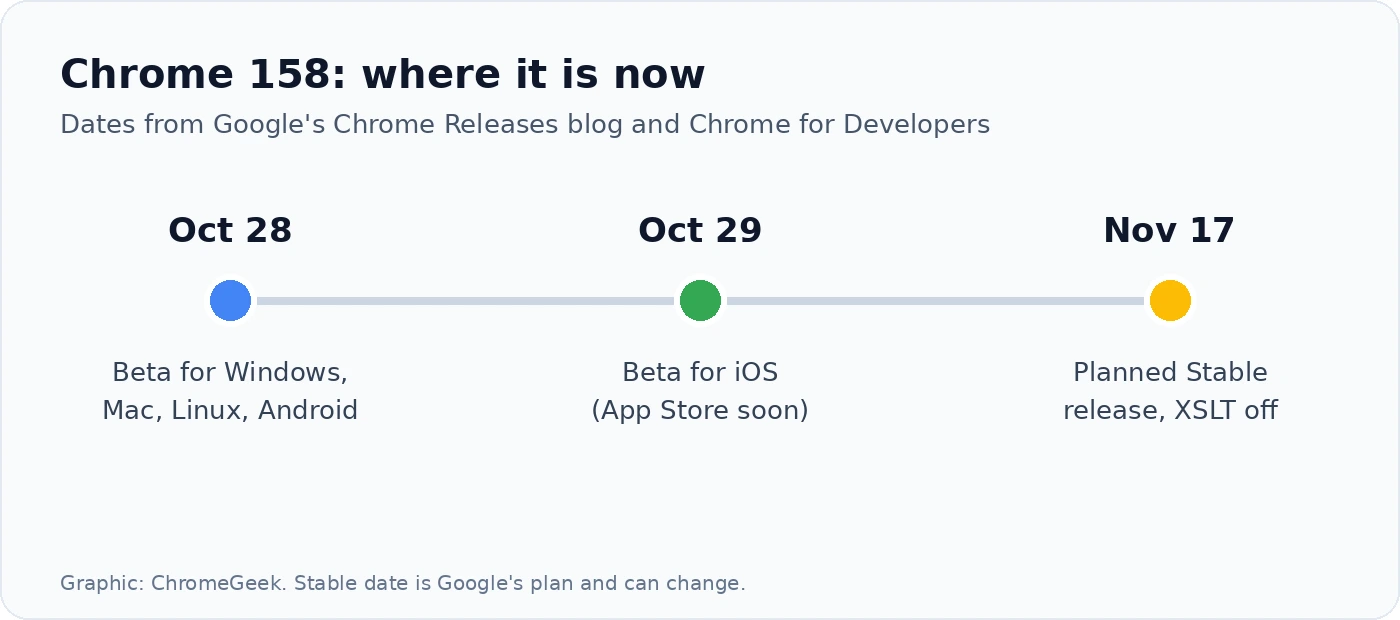
Chrome 158 is now in beta. Google promoted Chrome 158 to the Beta channel on October 28 for Windows, Mac and Linux, as version 158.0.8127.2, with the same build reaching Chrome Beta for Android the same day. Chrome Beta 158 for iOS followed on October 29.
1. Websites can offer their own install button
What changes: right now, installing a web app usually means finding the install icon in Chrome’s address bar or menu. In Chrome 158, according to Chrome Platform Status, the new Web Install API lets a website prompt you to install a web app, given the app’s manifest URL and an optional manifest ID.
Two ways to do it: sites can use a script method called navigator.install(), or a simple <install> element that works without JavaScript. Both can install apps across sites, so one website could offer to install another site’s web app.
Still your choice: the site can only ask. Chrome shows the request and you decide whether to install.
For IT admins: schools and businesses can block user installs with the WebAppInstallByUserEnabled policy, or limit the feature to chosen sites with the web-app-installation permissions policy. The feature’s Chrome Platform Status entry lists Microsoft engineers as its owners.
2. XSLT stops working
What it is: XSLT is a very old way to turn XML files into web pages, standardised in 1999. Few sites still use it in the browser today.
Why it is being removed: Google says the library Chrome uses for XSLT is aging C code that is prone to memory safety bugs, and that XSLT has been behind several recent high-profile security exploits. Firefox and Safari’s engines also plan to remove it.
What to expect: from Chrome 158, XSLT stops working on Stable for everyone except sites in Google’s origin trial and companies using the enterprise policy. Those exceptions end with Chrome 176, planned for August 2027. If an old RSS feed or XML page looks broken after the update, this is likely why.
3. Other changes in Chrome 158
Video and audio styling: new CSS states such as :playing, :paused, :buffering and :muted let sites style video and audio players based on what they are doing.
Faster pages: when a page is prerendered, sites can now opt in to prerender embedded frames from other sites too, so the whole page is ready sooner when you open it.
Under the hood: there is a batch of WebTransport upgrades for real-time apps, a universal ::highlight(*) selector, and smaller CSS and SVG additions.
Where Chrome 158 is today
Chromebooks and Googlebooks: Google’s beta notes cover desktop, Android and iOS only. ChromeOS usually gets each version a little later, and Google has not given a date yet, so we will cover the ChromeOS side when it lands. Chromebooks are currently on Chrome 156.
Chrome 157 first: before 158 arrives, Chrome 157 has started its early Stable rollout on Windows (version 157.0.8103.26/.27, with Mac coming shortly) and on Android (157.0.8103.30) to a small share of users. We covered its highlights when it was in beta.
Our take
The install change is the one most people will notice. Web apps are a big part of using a Chromebook or Googlebook, and a clear install button on the site itself is easier than hunting for a small icon in the address bar. It does mean more sites asking you to install things, so we are glad admins get controls and you still have the final say. The XSLT removal will not affect most people, but it closes off an old source of security bugs, which is good news for everyone.
Discover more from Chrome Geek
Subscribe to get the latest posts sent to your email.