Google Opens Gmail, Drive and Docs to AI Agents With MCP Servers and a CLI
 by
Sophie Sullivan
Post Updated: November 25, 2026
Google now has an official way for AI agents to work with your Gmail, Drive, Docs and Calendar. On November 24, Google made its Workspace Model Context Protocol (MCP) servers and the official Workspace command-line tool generally available, according to the Google Workspace Updates blog. Both are run by Google, so developers can connect AI agents to Workspace without writing their own integration code, while admins keep control over what those agents can do.
1. What Google launched
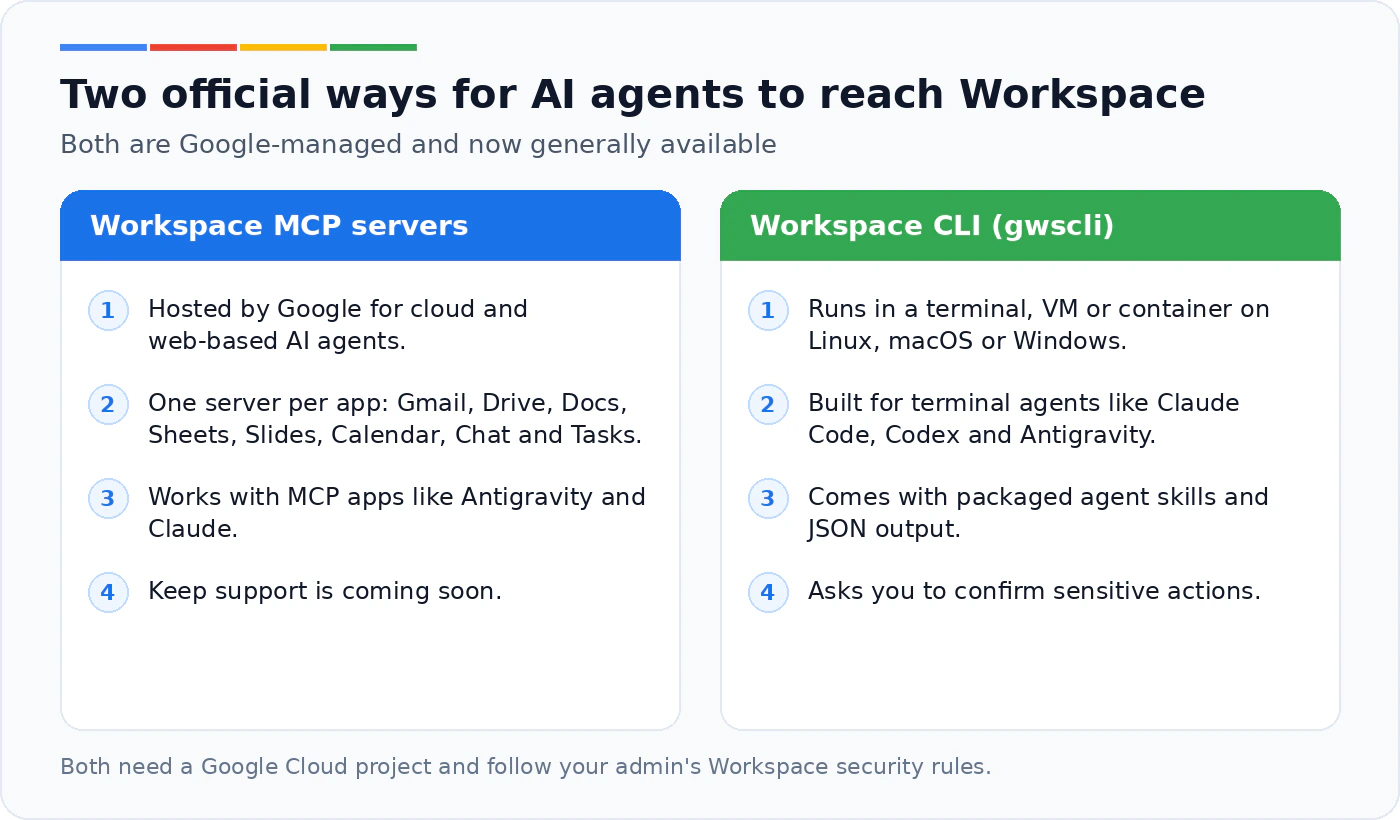
Workspace MCP servers: MCP is an open standard that lets AI apps plug into outside tools. Google’s servers give agents ready-made tools across Workspace, and each app has its own dedicated server. Google’s setup guide names Google Antigravity and Claude as example AI apps, and adds a Universal Search server that searches Gmail, Drive, Calendar and Chat with one tool.
Workspace CLI: gwscli brings the same Workspace tools to developer terminals, virtual machines and sandboxed containers. It is built for terminal agents such as Claude Code, Codex and Antigravity, and includes packaged agent skills, structured JSON output and built-in confirmation for sensitive actions. It runs on Linux, macOS and Windows.
Why not just use the old APIs? Google says both tools are made for AI agents rather than fixed app calls. MCP tools return summaries instead of raw data line by line, which Google says lowers token costs and speeds things up.
2. What agents can do in Gmail and the other apps
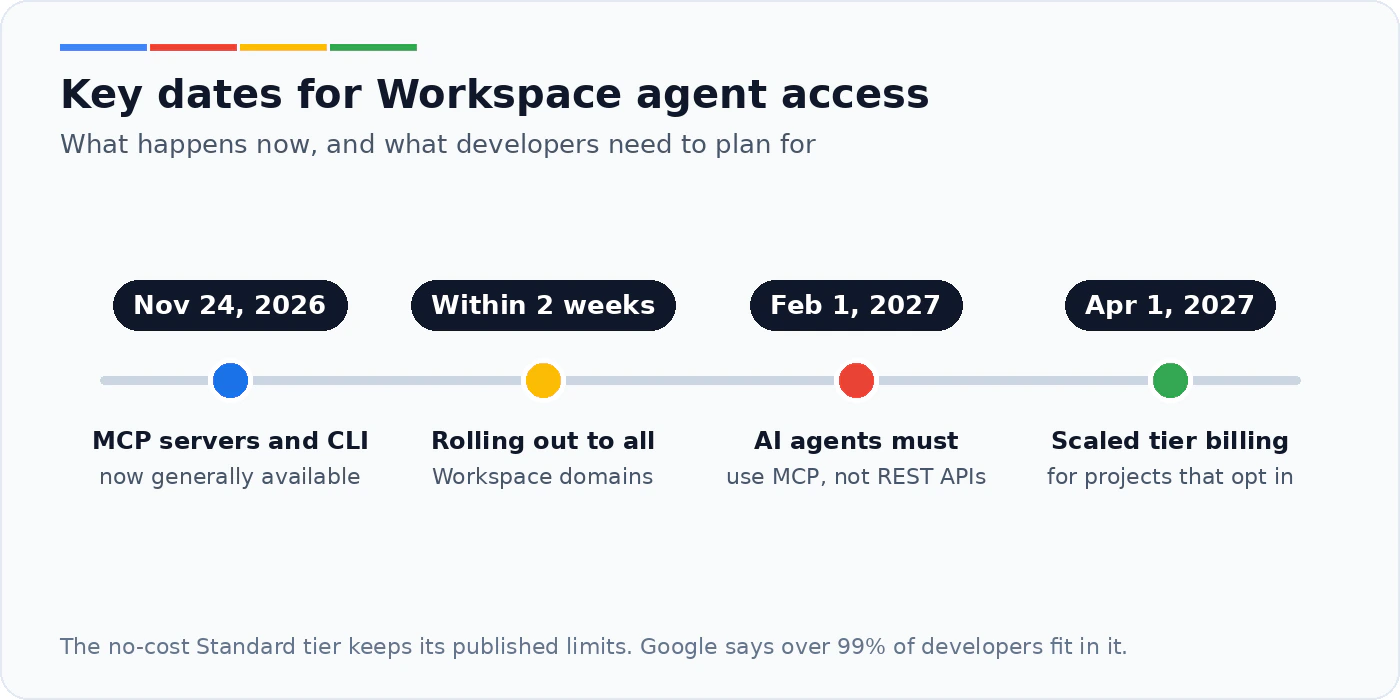
Rollout and sources: everything in this table is rolling out to all Workspace domains over the next 2 weeks. The actions column comes from Google’s CLI guide, and each MCP server has its own tool list in Google’s developer docs.
Gmail drafts, not auto-send: the Gmail MCP server guide lists searching emails, reading threads, listing labels, creating draft emails and labeling messages. Neither that guide nor the CLI guide lists sending email, so for Gmail an agent writes the draft and you stay in charge of hitting Send.
Example requests: Google’s CLI guide suggests plain-language asks like “Summarize my unread email from this week and create a draft reply to my manager proposing Tuesday” or “Find my docs about the Q3 plan and list the open action items.”
3. Who can use it and what it costs
Availability: Google says the tools are available to all Google Workspace customers and developers, and are rolling out to Rapid Release and Scheduled Release domains over the next 2 weeks. The setup guide also has a quick personal mode for connecting an AI app to your own Google Account.
What you need: a Google Cloud project, an OAuth client marked for use by an AI-powered agent, and an AI app that supports MCP. The CLI has no separate tool charge, and its requests count toward your project’s Workspace usage tier.
Two usage tiers: starting with Gmail, Drive and Calendar, Workspace APIs, MCP servers and the CLI now have a no-cost Standard tier with published rate limits and a Scaled tier for higher limits. From April 1, 2027, Scaled tier projects pay only for usage above daily free allowances. Projects that do nothing drop to Standard limits rather than being charged.
4. Controls for admins and users
Admin console: admins can manage access for external AI tools, the MCP servers and the CLI, set rules that make users confirm sensitive actions, and view agent audit logs under Security > API Controls.
Confirm before risky steps: routine actions like creating a draft stay quick, while admins can require a confirmation for things like reading external files or sharing data in third-party AI tools.
Your existing rules still apply: Data Loss Prevention rules kick in automatically when someone uses an AI agent. A new Workspace AI Tools Addendum also bans using agents to scrape Workspace APIs or to store certain Workspace data for long periods.
MCP becomes the rule: AI agents and similar tools must use MCP rather than Workspace REST APIs, with technical enforcement starting on February 1, 2027. Google says more detailed agent policies will follow over the coming months.
Our take
This is a big deal for anyone who wants an AI assistant to actually work with their email and files. With general availability, tools like Claude or Antigravity get an official, Google-run path into Gmail, Drive and Docs, with admin controls and audit logs built in. We also like that the documented Gmail actions stop at drafts rather than sending. Chromebook owners who use the Linux development environment should be able to try the CLI, since it supports Linux on x86_64 and ARM64, though we have not tested it yet.
Full setup steps are in Google’s Workspace CLI guide.
More on AI agents: Antigravity’s Knowledge Work mode, Gemini computer use on Mac and Modern Web Guidance for coding agents.
Discover more from Chrome Geek
Subscribe to get the latest posts sent to your email.