Chrome Gets an Urgent Fix for a Critical Sandbox Escape Bug
 by
Sophie Sullivan
Post Updated: November 24, 2026
Google has pushed out an urgent Chrome update that fixes one security bug, and it is rated Critical. On November 23, Google moved the Stable channel to version 158.0.8127.88/.89 for Windows and Mac and 158.0.8127.88 for Linux, according to its Stable Channel update note. The update rolls out over the coming days and weeks, and its only security fix is CVE-2026-134401.
1. What the bug is
The short version: the CVE record says improper input validation in Variations in Chrome before 158.0.8127.88 allowed a remote attacker to potentially execute arbitrary code outside the sandbox via a crafted HTML page. In plain English, a booby-trapped web page could, in theory, run its own code on your computer and get past one of Chrome’s main safety walls.
What Variations is: Variations is the part of Chrome that Google uses to switch features and experiments on or off for groups of users. It is not something you see or change yourself, which is why updating is the only real fix.
Why the sandbox matters: Chrome runs web pages inside a locked-down sandbox, so even when a page finds a bug it usually stays boxed in. A bug that can reach code outside the sandbox is the kind Google saves its top Critical rating for.
2. How serious is it?
Severity score: CISA’s assessment on the CVE record gives it a CVSS 3.1 score of 9.6 out of 10. An attacker needs no account or special access, but you would have to open or interact with their page.
Not under attack, as far as we know: Google’s note does not say the bug has been used in real attacks, and CISA’s assessment lists exploitation as none so far. That is different from the zero-day Chrome fix earlier this month, where Google confirmed active attacks. Still, details of a Critical bug tend to leak once a patch is out, so it is best not to wait.
Found by Google: the note credits Google itself with reporting the bug on August 28, 2026. As usual, Google is keeping bug details private until most people have updated.
3. Which version you should have
Extended Stable: businesses and schools on the slower Extended Stable channel get the same Critical fix in 156.0.8078.114 for Windows and Mac, released the same day.
Android: Chrome 158.0.8127.92 for Android is reaching Google Play over the next few days. Google says Android releases contain the same security fixes as the matching desktop releases unless it notes otherwise.
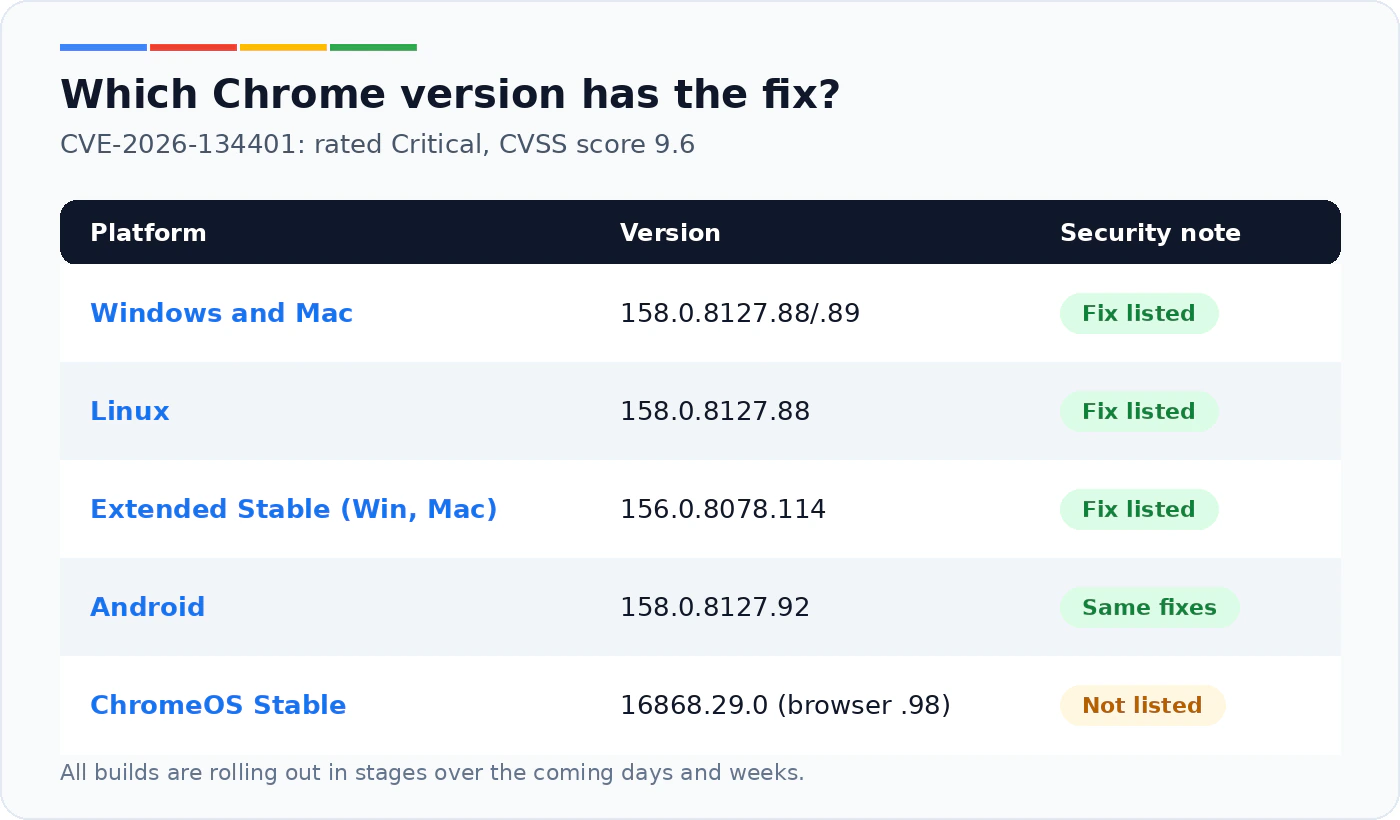
Chromebooks: the ChromeOS Stable update to version 16868.29.0 started rolling out to most ChromeOS devices the same day. It ships browser version 158.0.8127.98, a newer build than the 158.0.8127.88 desktop fix. Google’s ChromeOS note does not list any security fixes, though, so we cannot say for sure that this exact bug is covered there. Installing it is still the safest move.
4. How to update now
- Windows, Mac and Linux: type chrome://settings/help in the address bar and press Enter. You can also click the three-dot menu, then Help > About Google Chrome. Chrome checks for the update and downloads it.
- Click Relaunch when it appears. Your open tabs come back after the restart, but save anything you are typing first.
- Check that the About page now shows 158.0.8127.88 or later (or 156.0.8078.114 or later on Extended Stable).
- Android: open the Play Store, search for Chrome and tap Update if you see it.
- Chromebook: go to Settings > About ChromeOS > Check for updates, then restart when asked.
Not showing yet? Google rolls Chrome out in waves, so it can take a few days to reach everyone. Checking the About page usually pulls it in sooner.
Our take
A one-fix Chrome update is usually a sign Google wanted this bug closed fast, and a 9.6 score explains why. The good news is that there are no reports of attacks yet, so a quick restart puts you ahead. Chromebook owners should take the new ChromeOS build too, even though Google has not spelled out what it fixes.
More Chrome security news: Chrome 158 and its 204 security fixes, ChromeOS 158 VM escape fixes and the Chrome zero-day fix.
Discover more from Chrome Geek
Subscribe to get the latest posts sent to your email.