Chrome 158 Is Here With 204 Security Fixes, 6 of Them Critical
 by
Sophie Sullivan
Post Updated: November 18, 2026
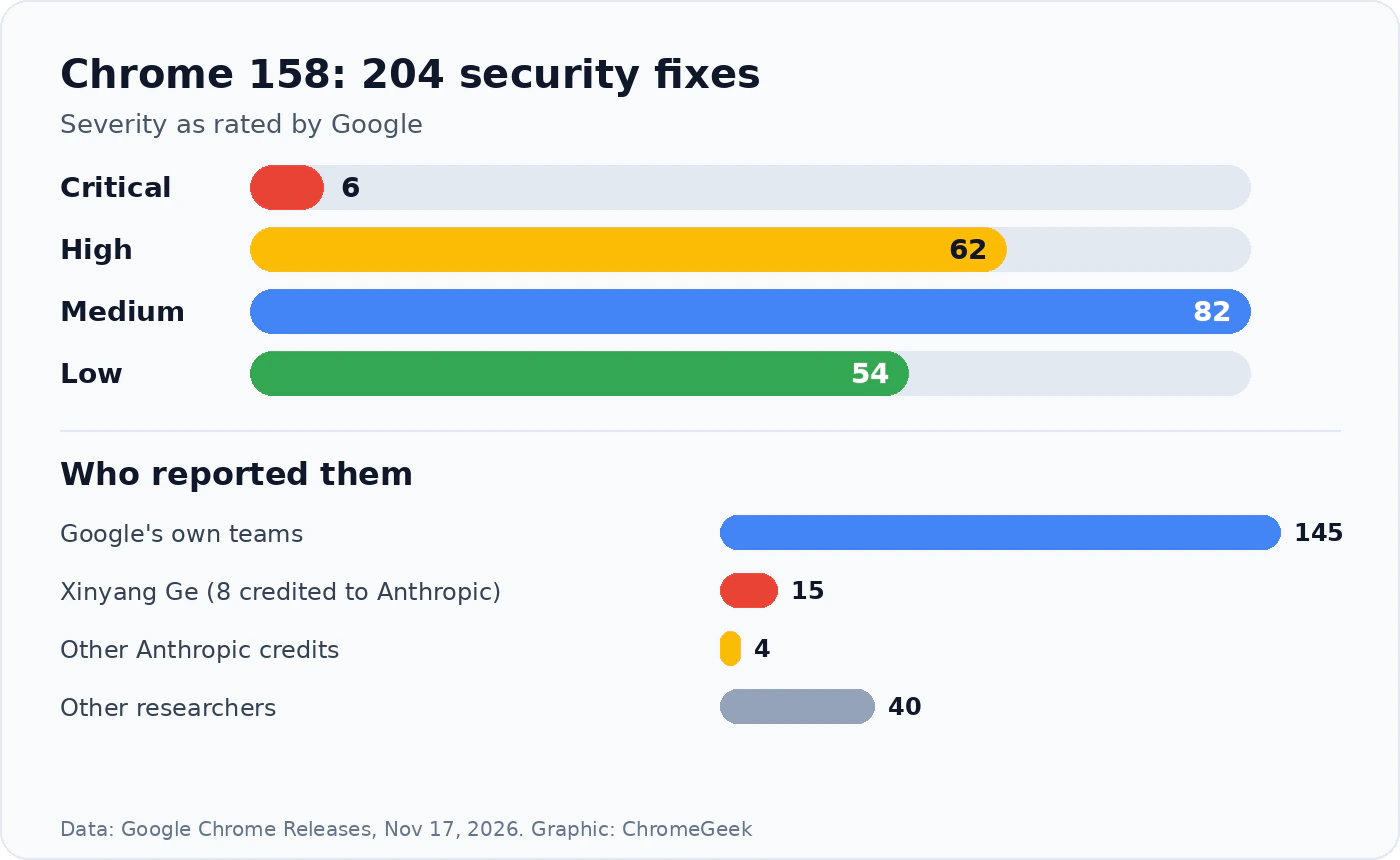
Chrome 158 is now rolling out, and it fixes 204 security bugs in one go, six of them rated Critical. Google promoted Chrome 158 to the Stable channel on November 17 as version 158.0.8127.36/.37 for Windows and Mac and 158.0.8127.36 for Linux, according to its Stable Channel update note. Chrome 158 for Android (158.0.8127.42) started reaching Google Play the same day.
1. What this update fixes
A huge batch: 204 security fixes is one of the largest lists we have seen in a single Chrome release. For comparison, the Chrome 156 security patch we covered in October fixed 52. Google’s note does not say that any of these bugs are being used in real attacks.
The six Critical bugs: Critical is Google’s top rating, used for bugs that could let an attacker run code on your device just because you opened a bad web page. Two of them were found by Google itself and four by Xinyang Ge.
The rest: the 62 High bugs touch almost every part of the browser, from extensions and autofill to forms, WebGL and Chromecast support. As usual, Google is keeping bug details private until most people have updated.
2. AI tools keep finding Chrome bugs
The standout detail: Xinyang Ge reported 15 of the 204 bugs. Eight of those are credited to Anthropic, seven of them with help from its Claude model. Anthropic is also credited on four more, three with the security firm Ada Logics.
Google’s own share: Google’s internal teams found 145 of the bugs, and 40 came from other outside researchers.
Why it matters to you: AI tools that can read code and spot weak points are making these patch lists longer. That is good news as long as you install updates quickly, because attackers have access to the same kind of tools.
3. What else is new in Chrome 158
Install buttons from websites: the new Web Install API and an install element let a website ask Chrome to install a web app, even one from another site. The site can only ask, and you still decide. Schools and businesses can switch it off with an admin policy. We explained it in detail in our Chrome 158 beta preview.
XSLT stops working: Chrome no longer runs XSLT, a very old way of turning XML files into web pages, for everyone except sites in Google’s origin trial and companies using the enterprise policy. Those exceptions end with Chrome 176 in August 2027. If an old RSS feed or XML page looks broken now, this is the likely reason.
Smaller changes: sites can style video and audio players by state (playing, paused, buffering, muted and more), WebHID support for custom keyboards and gaming mice arrives on Android 17 phones, and there are upgrades for real-time web apps under the hood.
4. Which version you should have
Chromebooks: Chrome on a Chromebook updates with ChromeOS itself. The latest ChromeOS Stable update on November 13 brought browser 156.0.8078.102, while ChromeOS 158 has been in the Beta channel since early November. Google has not given a Stable date for it yet.
Googlebooks: Googlebooks are still getting Chrome 157 for Googlebook, and Google has not said when Chrome 158 will follow there.
5. How to update Chrome now
- Windows, Mac and Linux: open Chrome, click the three-dot menu, then Help > About Google Chrome. Chrome checks for the update and downloads it.
- Click Relaunch when it appears. Your open tabs come back after the restart, but save anything you are typing first.
- Android: open the Play Store, search for Chrome and tap Update if you see it.
- Chromebook: go to Settings > About ChromeOS > Check for updates to make sure you have the latest Stable build.
Not showing yet? Google rolls Chrome out in waves over days or weeks, so it can take a while to reach everyone. Checking the About page usually pulls it in sooner.
Our take
Chrome 158 is a rare release that is both a big security patch and a real feature update. Six Critical bugs is reason enough to restart your browser today, and the new install buttons should make web apps easier to find, which matters a lot for Chromebook and Googlebook owners who live in web apps. The catch is that those devices have to wait for their own update, so keep an eye out over the coming weeks.
Earlier this month Google patched a Chrome bug that was already being attacked. Here is what happened.
Discover more from Chrome Geek
Subscribe to get the latest posts sent to your email.