ChromeOS 158 Is Rolling Out With VM Escape Fixes and 400 Chrome Patches
 by
Sophie Sullivan
Post Updated: November 19, 2026
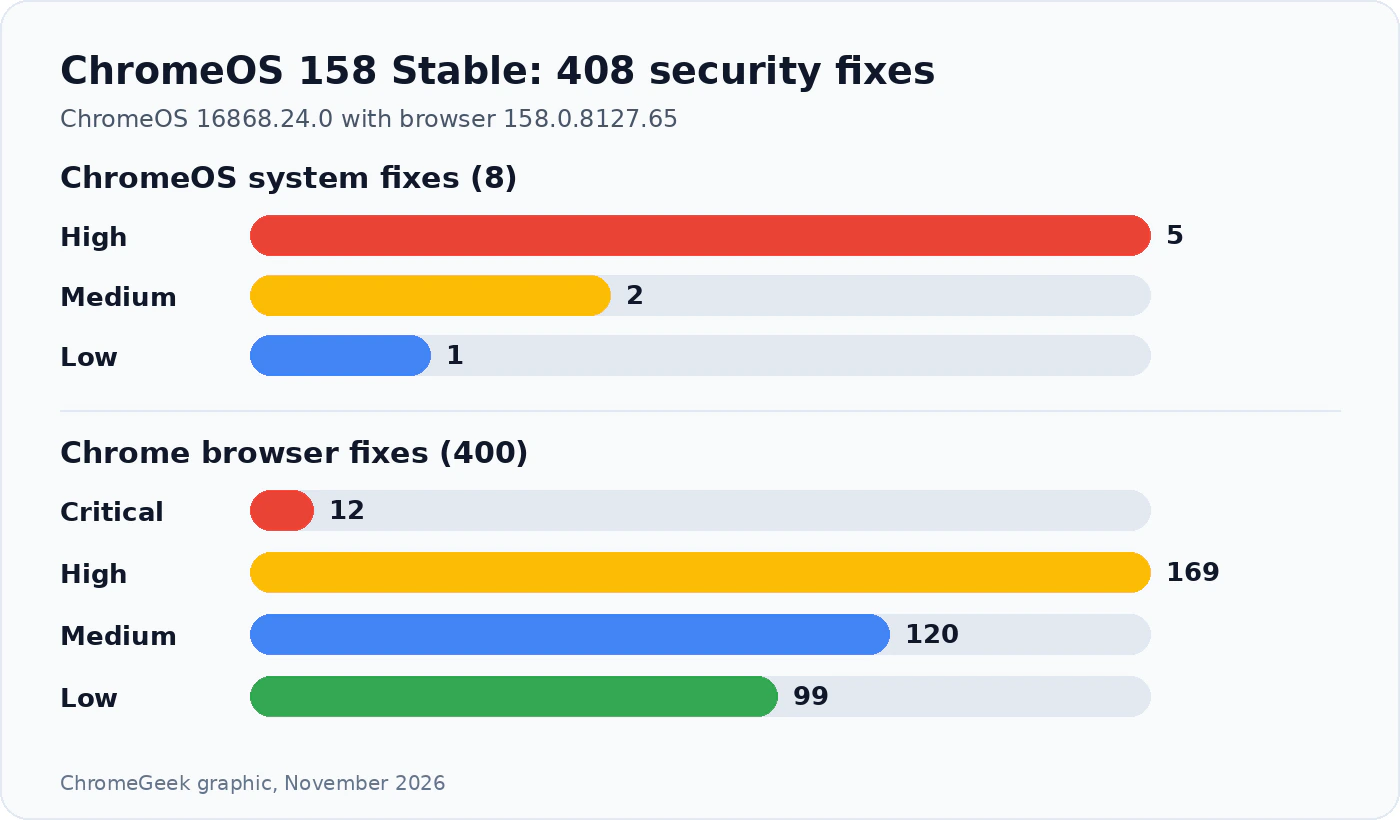
ChromeOS 158 has reached the Stable channel, and it is a big security update. Google started rolling out ChromeOS version 16868.24.0, with Chrome browser 158.0.8127.65, to most Chromebooks and ChromeOS Flex computers on Wednesday, November 18, according to its Stable channel update note. Besides a huge batch of browser fixes, it patches eight flaws in ChromeOS itself, including two bugs that could let code escape from a virtual machine.
1. What ChromeOS 158 fixes
Two lists: Google’s note splits the security work into fixes for ChromeOS itself and fixes for the Chrome browser that ships with it. Google does not say that any of these bugs are being used in real attacks.
A bigger browser list than usual: ChromeOS Stable was on version 156.0.8078.102 until this update. Because Chromebooks skip a whole version, the note lists 400 browser fixes, almost double the 204 we counted for Chrome 158 on Windows, Mac and Linux. For comparison, our ChromeOS M-156 update story covered 10 fixes.
2. The ChromeOS-only fixes
What they protect: most of these bugs sit in the parts of ChromeOS that run other operating systems in a safe box (a virtual machine, or VM). That includes the Linux development environment and, on newer Chromebooks, Android apps. A VM escape means code running inside that box could break out and reach the main system.
Why Linux and Android users should care most: five of the eight fixes involve the virtual machines that power Linux apps and Android apps on a Chromebook. If you never turned on Linux, you are less exposed, but most Chromebooks can run Android apps, so it is still worth updating.
The certificate fix: certificate authorities vouch for the secure padlock you see on websites. If one of those authorities is compromised, attackers could fake secure connections, so this fix matters for everyone, even if you only use the browser.
3. What the browser side brings
Same Chrome 158: the browser on your Chromebook is now version 158.0.8127.65. Among its 400 fixes are 12 Critical bugs, Google’s top rating for flaws that could let a bad web page run code on your device.
New features come along: Chrome 158 also brings the Web Install API and install element, which let websites offer a button to install a web app, and it stops running old XSLT pages. We covered both in our Chrome 158 story linked above. Google’s ChromeOS note itself lists security fixes only, and it does not mention new ChromeOS features.
4. Which version you should have
Googlebooks: this release is for ChromeOS. Googlebooks get their own updates, and they are still receiving Chrome 157 for Googlebook.
5. How to update your Chromebook
- Open Settings, then select About ChromeOS.
- Select Check for updates. Your Chromebook downloads the update in the background.
- Select Restart when it appears. Save your work first, and close Linux apps and Android apps so they restart cleanly.
- Back in About ChromeOS, check that the version starts with 158.
Not showing yet? Google says the update is reaching “most” ChromeOS devices and rolls it out in waves, so it can take a few days. School and work Chromebooks follow the update rules their admin sets.
Our take
This is not a flashy update, but it is an important one. Linux apps and Android apps are a big part of what makes a Chromebook useful, and this release closes holes in exactly the tools that keep them safely boxed in. Add 12 Critical browser fixes on top and there is no reason to wait. Check for the update today and restart.
Discover more from Chrome Geek
Subscribe to get the latest posts sent to your email.