ChromeOS M-156 Stable Update Brings 10 Security Fixes
 by
Sophie Sullivan
Post Updated: November 7, 2026
ChromeOS Stable just picked up a security update for Chromebooks and ChromeOS Flex. Google’s Chrome Releases note from Friday, November 6, says M-156, ChromeOS version 16836.32.0 (browser 156.0.8078.93) is rolling out on the Stable channel, with 10 Chrome browser security fixes.

1. What shipped
The build: Google lists M-156, ChromeOS 16836.32.0, with browser 156.0.8078.93. That browser build is newer than the Chrome 156 security patches we covered earlier for desktop and Android, including the 21-fix Chrome 156 update and the earlier 52-fix Chrome 156 patch.
What it is not: there is no feature list in this note. No new ChromeOS UI, no Chrome 157 promotion for Chromebooks yet. It is the Stable channel security drop Chromebook owners have been waiting on while desktop Chrome moved ahead.
2. The 10 security fixes
Severity mix: Google lists 10 Chrome browser security fixes with this ChromeOS Stable update. Counting the labels in the post, that is 7 High, 2 Medium and 1 Low. Google does not say any of them are being used in real attacks, and bug details stay restricted until most devices have updated.
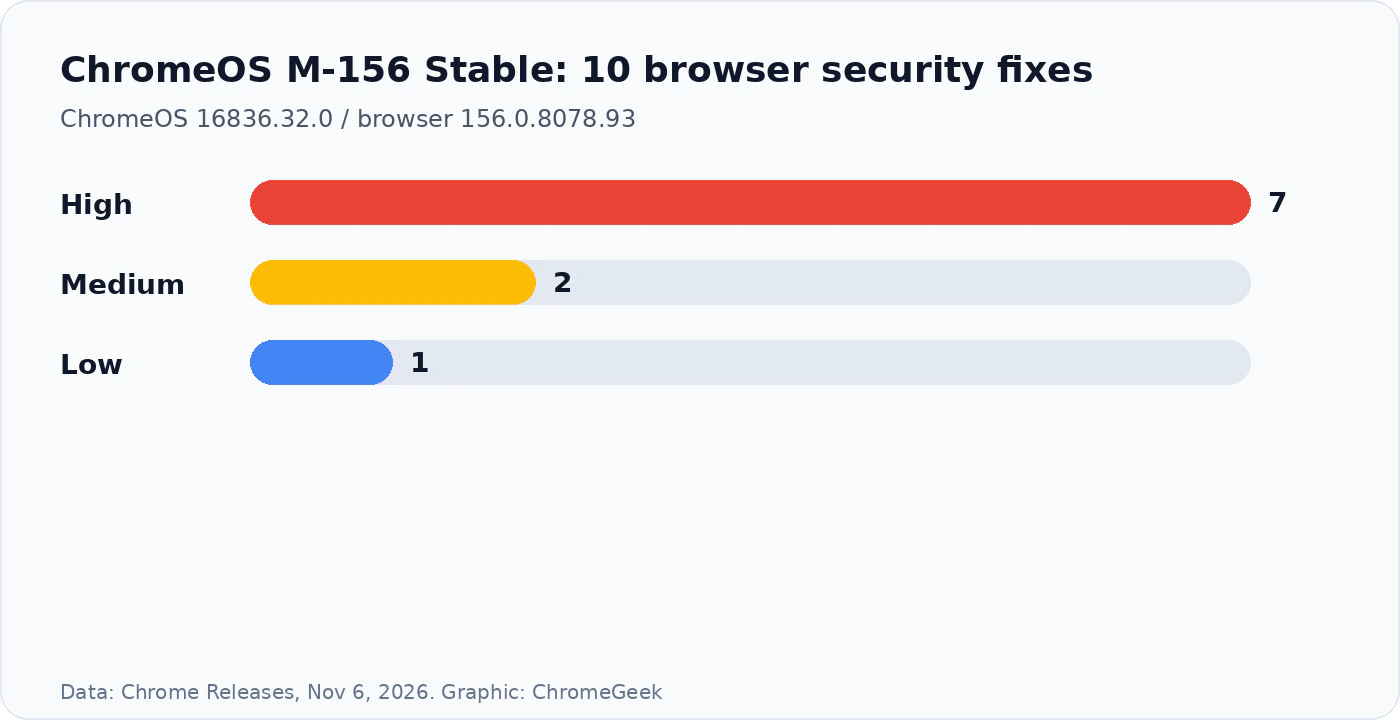
Why it matters: High-severity browser bugs are the ones that usually matter most on a Chromebook, because Chrome is the main app. Getting them through a ChromeOS update is how Stable devices stay current without jumping channels.
3. Which version you should have
Reading the table: Chromebooks and Flex on Stable should look for 16836.32.0. Desktop Chrome is on a different track now (157), so do not expect the Chromebook browser version to match your Windows or Mac Chrome build.
4. How to update a Chromebook or Flex device
- Open Settings, then About ChromeOS (on Flex it is the same About page).
- Click Check for updates. Keep the device plugged in and online while it downloads.
- Restart when ChromeOS asks. After reboot, confirm the version shows 16836.32.0 and the browser is 156.0.8078.93 or later.
- If nothing appears yet, wait a day or two. Stable updates roll out in waves.
Enterprise and school devices: managed Chromebooks may get the update on the admin’s schedule. If Check for updates stays quiet, ask your admin or wait for the policy wave.
Our take
This is the quiet but important kind of Chromebook news. Desktop Chrome already moved to 157 with a huge security batch, while Stable Chromebooks were still catching up on the Chrome 156 line. Install 16836.32.0 when it shows up, confirm the browser build, and you are done. We will cover ChromeOS 157 Stable when Google posts it.
Want the desktop side of this story? Chrome 157 is already Stable with 213 security fixes.
Discover more from Chrome Geek
Subscribe to get the latest posts sent to your email.