Chrome 157 Is Here: HTML-in-Canvas and 213 Security Fixes
 by
Sophie Sullivan
Post Updated: November 4, 2026
Chrome 157 is now the Stable version. Google promoted it on Tuesday, November 3, for Windows, Mac and Linux, and the Android build is heading to Google Play too. It is a big security release with 213 fixes, and the main new feature is aimed at web developers.
1. Which version you get
Where it is available: Google announced the release in its Stable Channel Update for Desktop and posted a separate note for Android on the Chrome Releases blog. Both say it is a gradual rollout, so your copy may take a few days to show up.
How to read it: Green means Google has started the rollout, and amber means it is coming or has not been posted yet. The Android build reaches Google Play “over the next few days,” and Google’s ChromeOS Beta post this week covers Chrome 158, not 157.
2. 213 security fixes
Update soon: Google lists 213 fixes in this release. Counting the severity labels in the desktop post, that is 7 Critical, 77 High, 75 Medium and 54 Low. Several of the reports were credited to AI-assisted research, including Anthropic and OpenAI Codex Security. Google keeps bug details restricted until most people have updated.
What to do: open Chrome’s menu, choose Help, then About Google Chrome (or go to chrome://settings/help). Chrome downloads the update, then asks you to relaunch. If you cannot see it yet, check again in a day or two.
3. HTML-in-Canvas is now stable
The short version: a canvas is the web’s blank drawing surface, used for games, 3D scenes and big design tools. Until now, text and buttons drawn there were just pixels, so you could not select them, translate them or have a screen reader read them. With HTML-in-Canvas, developers can draw real HTML elements inside the canvas, and the browser still treats them as normal page content.
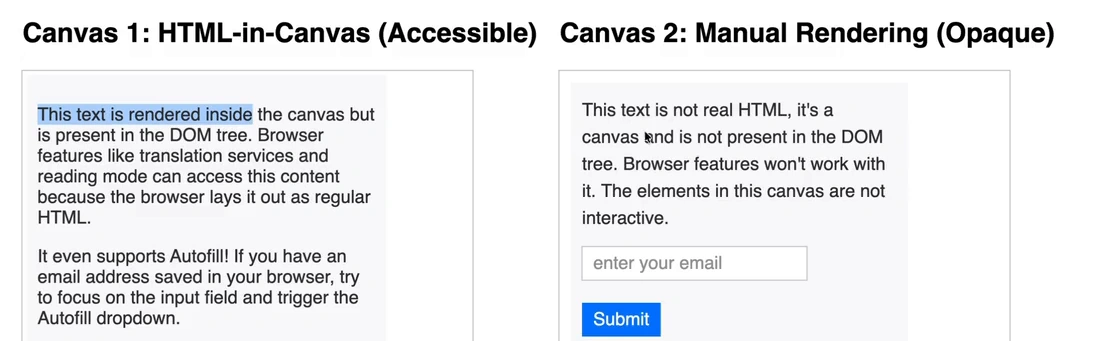
What it unlocks: according to Google’s announcement, text selection, copy and paste, right-click menus, accessibility support, translate, autofill, Find-in-Page, browser extensions and DevTools all work on content inside the canvas. Google lists large canvas-based apps, 3D scenes and games, media editing and export, and shader-style effects as the main uses.
Will you notice it? not directly. This is a building block, so you will see it when sites and games start using it. Google notes that Three.js, PlayCanvas, Babylon.js and PixiJS already have support, and that developers should check for support first because other browsers may not have it yet.
4. Other changes in Chrome 157
A quick scan: these come from Chrome Platform Status, plus Google’s enterprise release notes as summarized by HelenTech and IT Mikata (both in Japanese). Some features roll out to only some users first.
Related: we covered the Language Detector API when it was in Chrome 157 Beta, and the autofill change in Chrome’s enhanced autofill with Gmail.
5. What about Chromebooks?
Not yet: Chrome on ChromeOS follows its own release posts. Google’s blog this week has a ChromeOS Beta update for Chrome 158, but we did not find a ChromeOS 157 Stable post when we checked. When it arrives, you can update from Settings, then About ChromeOS, then Check for updates. We will update this post when Google announces it.
What is next: Chrome 158 is already in Beta, and you can see what is coming in our Chrome 158 Beta post. For a look back, here is Chrome 156, the release before this one.
Our take
Chrome 157 is mostly a security and developer release. For everyday use, the number that matters is 213, so update when it shows up. HTML-in-Canvas is a quiet but real step for web apps, because it makes canvas-based tools and games easier to read, translate and use with assistive tech.
Read more: Best Chrome Extensions and Google confirms Googlebook detachables.
Discover more from Chrome Geek
Subscribe to get the latest posts sent to your email.