Chrome 156 Gets a Second Security Update With 21 Fixes
 by
Sophie Sullivan
Post Updated: October 30, 2026
by
Sophie Sullivan
Post Updated: October 30, 2026
Google has released a second Chrome 156 security update in about a week, this time with 21 fixes, and one of them is rated Critical. According to Google’s Stable Channel update note from October 29, the Stable and Extended Stable channels are moving to 156.0.8078.79/.80 on Windows and Mac and 156.0.8078.79 on Linux, rolling out over the coming days and weeks. Chrome for Android got 156.0.8078.79 the same day.
1. What this update fixes
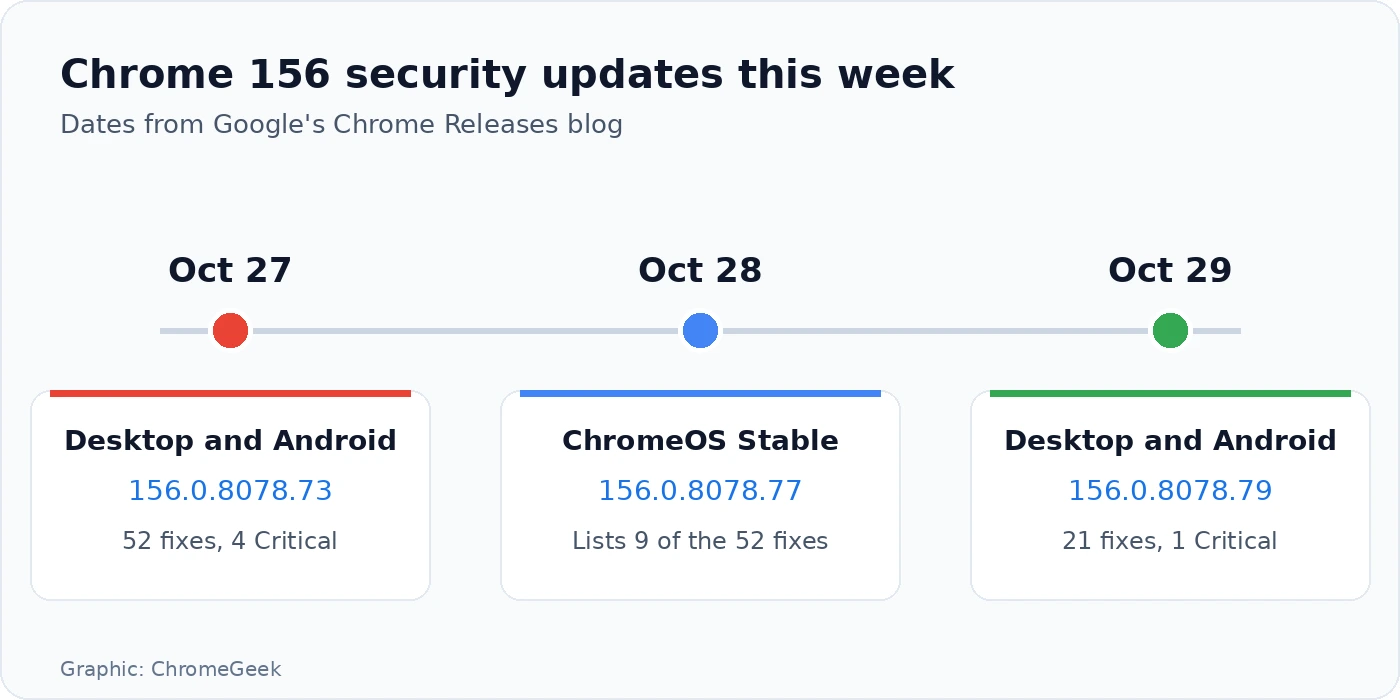
Another round: on October 27 Google shipped a Chrome 156 security update with 52 fixes, four of them Critical. Two days later it followed up with this smaller batch. There are no new features here, only security fixes.
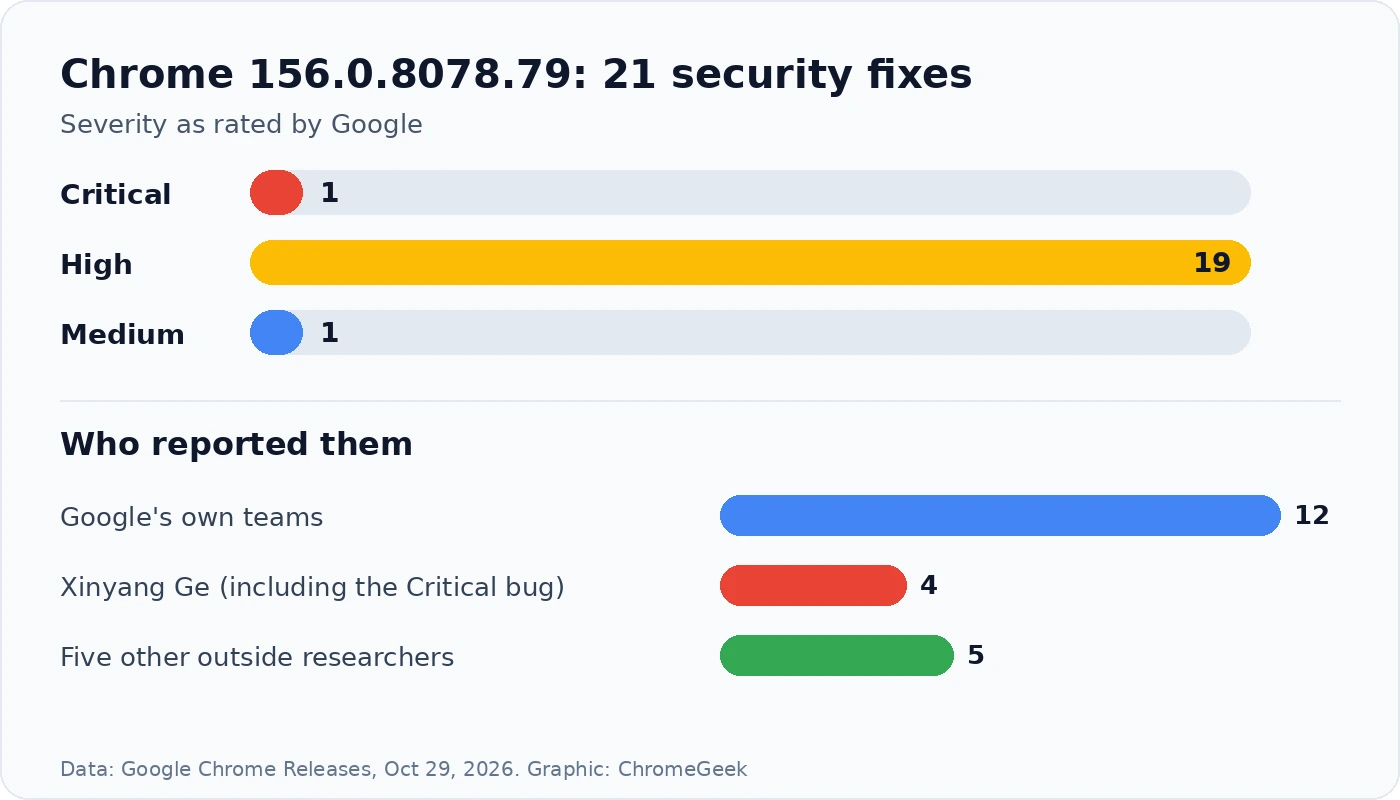
The Critical bug: CVE-2026-76024 is a memory corruption bug in MediaStream, the part of Chrome that handles camera and microphone streams for things like video calls. Critical is Google’s top rating, used for the most serious bugs, the kind an attacker could use through a bad web page. Security researcher Xinyang Ge reported it on October 21.
Mostly memory bugs: most of the 21 are use after free, memory corruption or input validation problems. These are the kinds of bugs attackers look for, because they can sometimes be used to run their own code. As usual, Google is keeping the bug details private until most people have updated.
2. Who found these bugs
Google did most of the work: Google’s own teams reported 12 of the 21 fixes, including the one Medium bug. Xinyang Ge, who also reported all four Critical bugs in last week’s patch, is credited with four more here, including the new Critical one.
Outside researchers: the other five came from five different outside researchers, each credited with one High bug, including a V8 bug reported by Hyeonjun Ahn and a Network bug reported by Cristian Di Nicola.
3. Which version you should have
Chromebooks: Chrome on a Chromebook updates with ChromeOS itself, not on its own. Google’s October 28 ChromeOS Stable update moved Chromebooks to ChromeOS 16836.30.0 with Chrome 156.0.8078.77. That note lists nine fixes from last week’s 52-fix batch, including one of its Critical bugs, but none of the 21 fixes in this new update. Google has not posted a ChromeOS build with them yet, so check for updates again over the next few days.
4. How to update Chrome now
- Windows, Mac and Linux: open Chrome, click the three-dot menu, then Help > About Google Chrome. Chrome checks for the update and downloads it.
- Click Relaunch when it appears. Your open tabs come back after the restart, but save anything you are typing first.
- Check the version on the same page. You want 156.0.8078.79 or later.
- Android: open the Play Store, search for Chrome and tap Update if you see it.
- Chromebook: go to Settings > About ChromeOS > Check for updates and restart if an update is waiting.
Not showing yet? Google rolls Chrome updates out in waves, so it can take a few days to reach everyone. Checking the About page usually pulls it in sooner.
Our take
Two security patches in one week can feel like a lot, but this is how it should work: bugs get found, fixed and shipped fast. This one is smaller than last week’s, yet it still has a Critical bug in the code behind video calls, so do not skip it. Restart Chrome and check for 156.0.8078.79. Chromebook owners are a step behind this time, so keep checking for the next ChromeOS update.
Discover more from Chrome Geek
Subscribe to get the latest posts sent to your email.