How to Install and Use NPR News on Chromebook and Googlebook
 by
Gloria Brown
Post Updated: November 12, 2026
You can install and use NPR News on Chromebook and Googlebook through the official Android app from Google Play or directly in your browser at npr.org. It brings live public radio streams, breaking news stories, and daily podcasts straight to your laptop.
Googlebook runs Android apps natively through Google Play alongside simple phone casting. This guide covers installing the app, choosing between the Android and web editions, listening to local stations and podcasts, and fixing common playback issues.
Need help setting up NPR News? Contact us with your laptop model and any playback or station questions.
How to install NPR News on Chromebook and Googlebook
Installing the official NPR app from Google Play takes less than a minute and lets you save audio stories and podcasts for offline listening:
The official Google Play listing uses the package identifier org.npr.android.news. Installing the Android app gives you push alerts for breaking stories and an offline playlist queue.
If the Play Store is missing on your laptop, review Google’s Android app setup guide for Chromebook or the guide on installing apps on Googlebook. On school or work devices, an administrator may restrict Google Play installs. There is no native Linux desktop package, so visiting npr.org in Google Chrome is the fastest fallback whenever you cannot install Android apps.
Cast NPR News from your phone on Googlebook
If you already follow your favorite shows and keep a listening queue on your Android phone, Googlebook’s Cast My Apps feature lets you mirror the app right onto your laptop screen. Open Phone Hub in the bottom-right corner of your Googlebook shelf, select Cast My Apps, and pick NPR News. Your phone’s active playback and saved playlist open in a desktop window without re-signing in or syncing files manually.
NPR News Web vs. Android app: choosing your setup
You can read stories and listen to NPR broadcasts through either the Google Play app or Google Chrome. Each option fits a different daily routine:
Reading breaking news and listening to audio stories
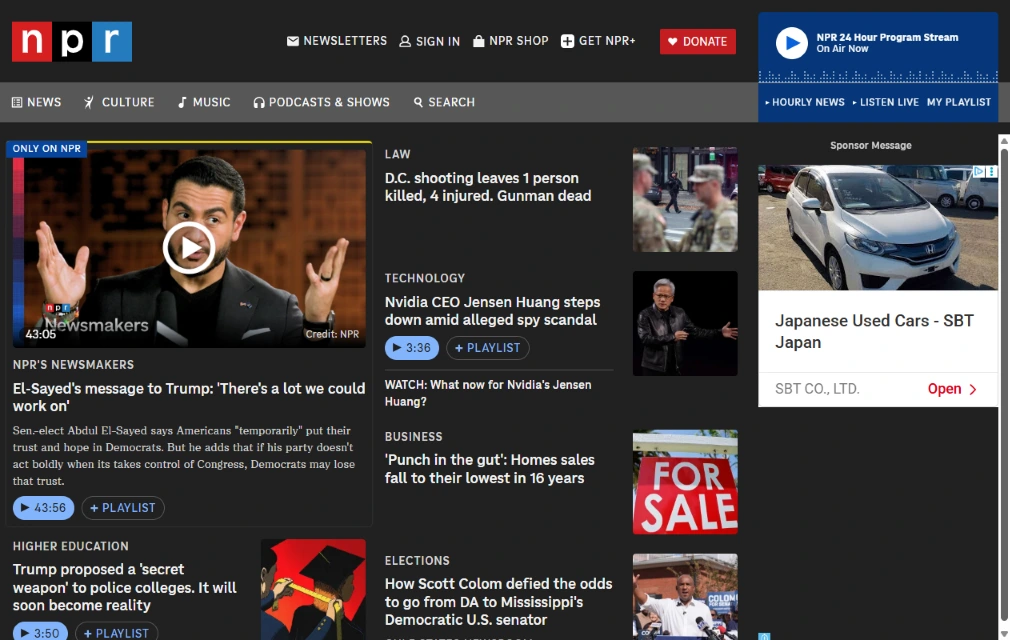
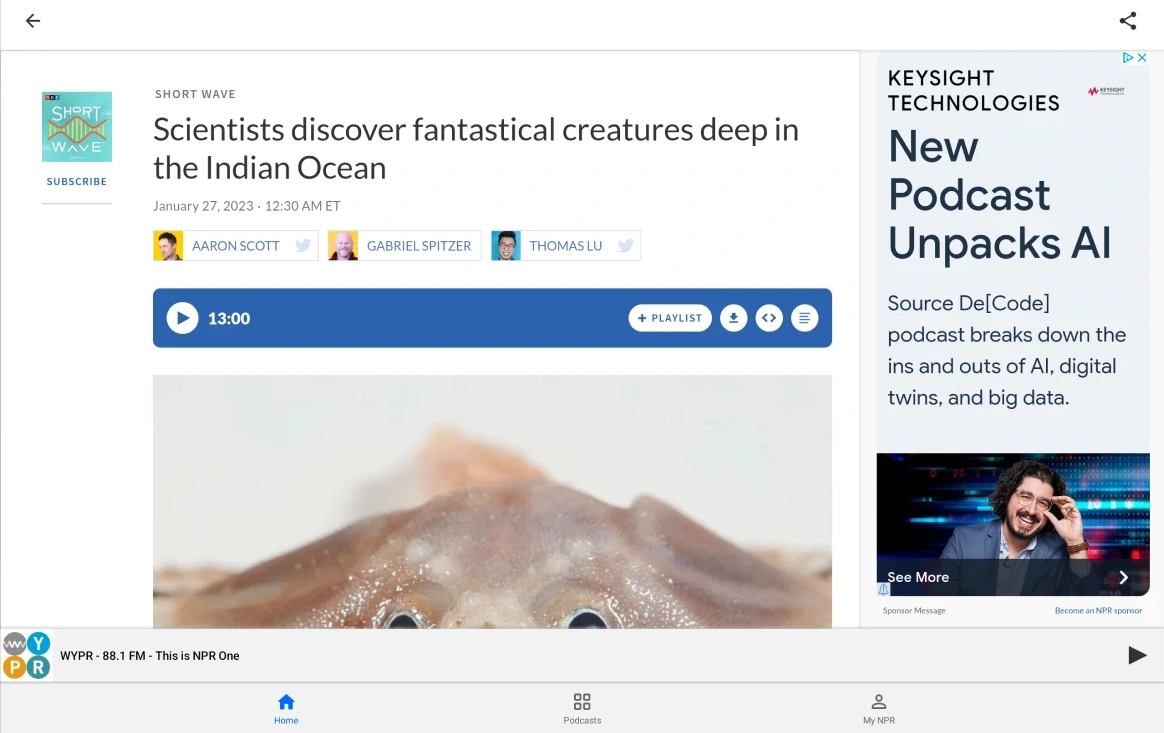
Inside the NPR app, articles and radio reports work together so you can read a story or press play to hear the broadcast version while you work in other tabs:
- Built-in story audio player: tap play at the top of reported stories to listen to the radio segment while scrolling through photos, transcripts, and related links.
- Queue stories in My Playlist: use the + Playlist button on any story or segment to line up multiple reports for hands-free listening.
- Offline story downloads: tap the download icon inside the Android app to save audio reports locally when you are away from Wi-Fi.
- Topic and section browsing: switch between U.S. news, world coverage, politics, business, science, and arts without leaving the main feed.
Streaming live local stations and NPR podcasts
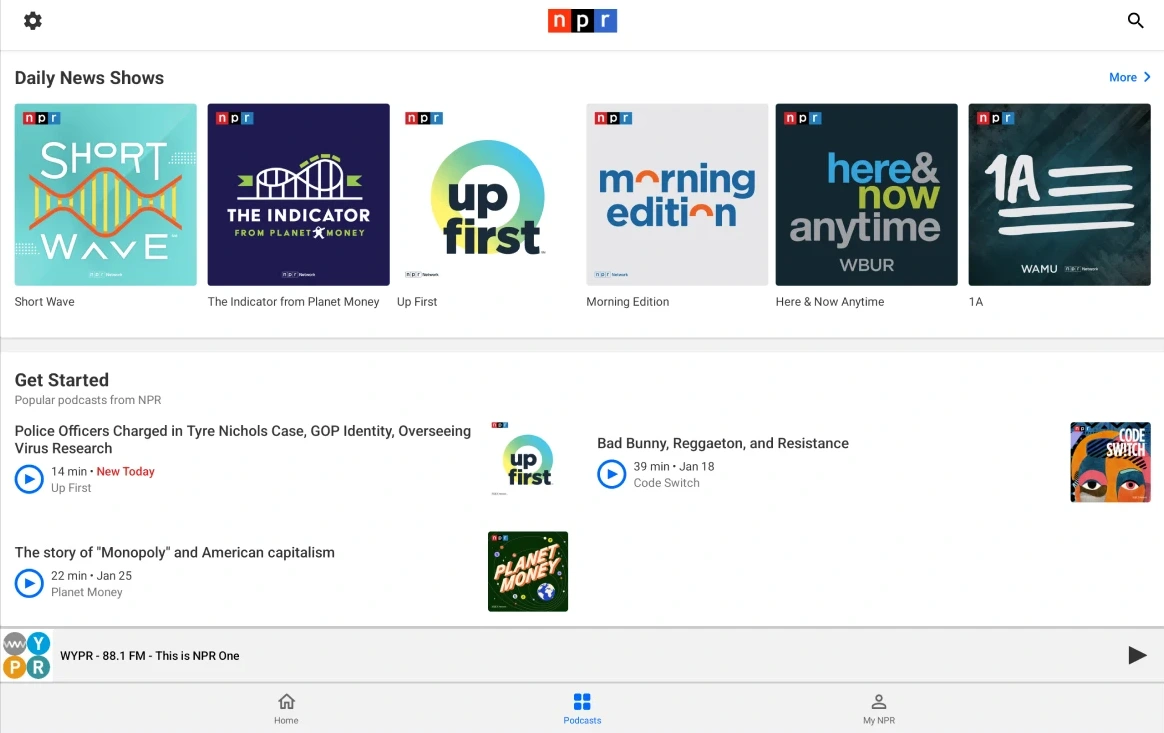
NPR’s Android app and web player connect national broadcasts with local public radio stations across the country:
- Live member stations: pick your local station by ZIP code or station name to stream live broadcasts of Morning Edition, All Things Considered, and regional news.
- Hourly News Updates: play the latest five-minute national news summary anytime from the persistent bottom bar or the top of the Home tab.
- Daily news and culture podcasts: browse full episodes of Up First, Short Wave, Planet Money, Code Switch, Fresh Air, and 1A inside the Podcasts tab.
- Background playback on ChromeOS: audio keeps playing smoothly in the background when you minimize the app or switch to Google Docs, Gmail, or another browser window.
Troubleshooting NPR News playback on ChromeOS
If live radio streams stall, audio stops in the background, or the Android app fails to load, try these quick fixes:
- No sound during live radio playback: open ChromeOS Quick Settings in the bottom-right corner and confirm the correct speaker or Bluetooth headphone output is selected. In Chrome, right-click the
npr.orgtab to make sure it is not muted. - Live stream buffers or drops: switch from a busy public Wi-Fi network or lower background downloads. If your local station stream stalls, test the national NPR 24 Hour Program Stream to see whether the issue is specific to that station feed.
- Android app freezes or crashes on launch: open ChromeOS Settings > Apps > Manage your apps > NPR > Storage and select Clear cache, then reopen the app.
- Web player controls fail to load: temporarily pause aggressive ad or script blockers on
npr.organd reload the page so the audio player scripts can run. - Wrong local station selected: open the app Settings menu (gear icon) and choose Change Station to search by city, state, or call letters.
Frequently asked questions about NPR News on Chromebook and Googlebook
Is the NPR News app free on Chromebook and Googlebook?
Yes. Both the NPR News Android app on Google Play and the npr.org website are free to use with no required subscription. You can optionally sign in or support your local member station.
Should I use the NPR News Android app or npr.org in Chrome?
Both work well on ChromeOS. Use the Android app if you want to download podcast episodes or audio stories for offline listening. Use npr.org in Google Chrome if you prefer full-screen reading, keyboard shortcuts, and zero local storage usage.
How do I cast NPR News from my phone to Googlebook?
Open the Phone Hub in the bottom-right corner of your Googlebook shelf and make sure your Android phone is connected. Click Cast My Apps and choose NPR News to open your phone’s active session in a desktop window.
Can I listen to my local NPR member station on a Chromebook?
Yes. In both the Android app and on npr.org, you can set your local member station by ZIP code or station call letters to stream live local broadcasts alongside national programs.
Why is NPR News audio not playing or cutting out in Chrome?
Check that the browser tab is not muted, verify your audio output device in ChromeOS Quick Settings, and make sure ad blockers or site permissions are not blocking audio playback on npr.org.
Companion news and audio guides
Explore more news readers and audio apps that pair well with NPR News on ChromeOS:
- International reporting and audio: For global journalism, live blogs, and daily podcasts, see our guide on The Guardian on Chromebook and Googlebook.
- Personalized headline feeds: To follow multiple publishers and local topics in one place, read how to set up Google News on Chromebook.
- More ChromeOS news readers: Compare top daily briefing apps and digital newspapers in our roundup of the Best News Apps for Chromebook.
- Music and podcast streaming: If you also want a dedicated desktop player for podcasts and playlists, check out How to Install and Use Spotify on Chromebook and Googlebook.
Discover more from Chrome Geek
Subscribe to get the latest posts sent to your email.